Free Project Proposal Template Word 2026: Nonprofits & AI
Download our free project proposal template word for nonprofits. Access 2026 step-by-step guidance, grant writing tips, and AI tools to craft winning proposals.

Abdifatah Ali
Co-Founder
You've got a deadline, a funder portal open in one tab, budget notes in another, and a blank Word document in front of you. That's where most nonprofit proposal stress starts. Not with strategy, but with formatting, missing sections, and the quiet fear that you'll spend hours writing something that still doesn't match what the reviewer wants.
A solid Project Proposal Template Word file fixes that first problem. It gives you a working structure, lowers decision fatigue, and helps a small team move faster. But the template has to do more than look tidy. It has to be usable for grants, not just generic business approvals.
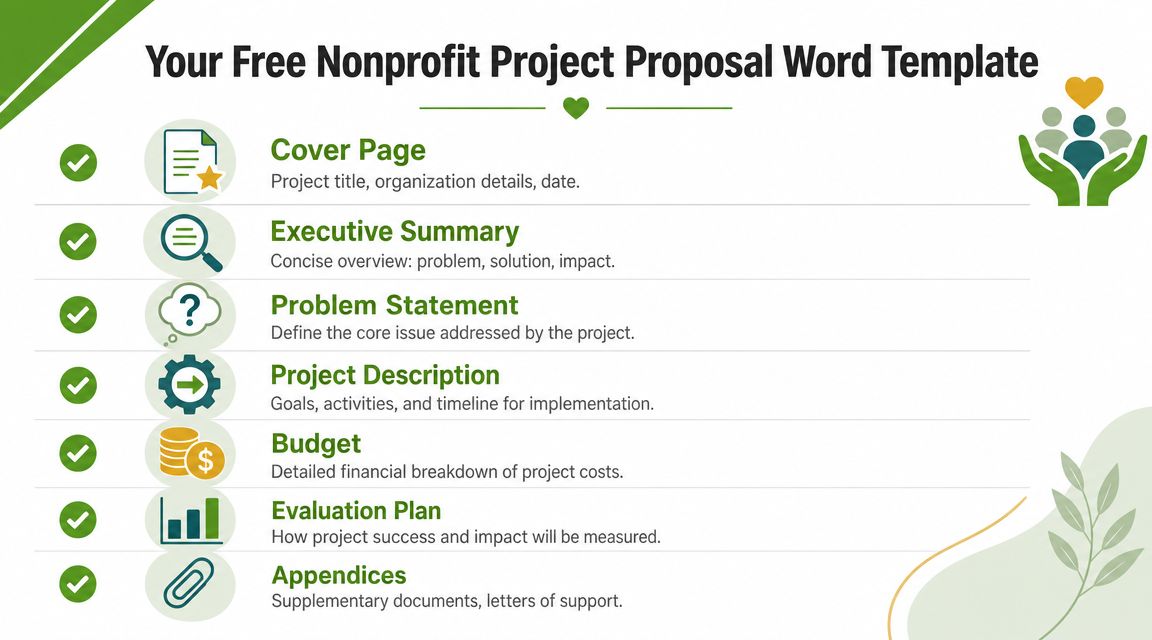
Your Free Nonprofit Project Proposal Word Template
Here's a helpful shortcut: start with a Word template that already reflects how nonprofit proposals are reviewed, then adapt it for the funder in front of you.
If you want a grant-focused model to compare against your own draft, use this nonprofit grant proposal template. It's useful because it reflects the sections nonprofit teams usually need to develop, not just the ones a general business proposal article lists.
What a nonprofit version needs
A generic proposal template often includes the basics. Title, executive summary, scope, timeline, budget. That's fine for internal approvals or simple vendor proposals.
It usually falls short for grants.
Guidance from the UNDP project proposal template indicates proposals should be under 10 pages and include major risk factors. NGO-focused templates also tend to require monitoring, evaluation, sustainability, and beneficiary targeting. Those sections are often missing from plain business templates.
Practical rule: If your Word template doesn't force you to explain who benefits, how outcomes will be measured, what risks could affect delivery, and what happens after the grant period, it isn't grant-ready yet.
The fastest way to use the template well
Don't fill it in from page one to page ten in order. That's where teams lose time.
Use this sequence instead:
- Start with the factual backbone. Program summary, target population, timeline, staffing, and rough budget.
- Draft the methodology next. Activities, who does what, when it happens, and what outputs each activity produces.
- Write the evaluation section before the executive summary. That forces clarity.
- Leave the executive summary for last. It reads better when the rest of the document is already stable.
Small teams also benefit from keeping a separate folder of reusable pieces. Board-approved language, staff bios, organization history, and standard attachment names save more time than most writing hacks. If your team handles a lot of recurring admin documents too, resources like WhisperAI's free business templates can help standardize surrounding workflows so proposal prep doesn't start from scratch every time.
Anatomy of a Winning Nonprofit Proposal
A reviewer doesn't read your proposal like a story. They read it like a test of logic. Does the need make sense. Do the activities respond to that need. Does the budget support those activities. Can the team deliver. Will success be measured in a way that can be verified.
That's why the structure matters.
According to the OAS proposal template, a high-quality proposal follows a strict sequence: executive summary, rationale, objectives, methodology, work plan, budget, and evaluation. That sequence makes the bid auditable because evaluators can verify scope, feasibility, and measurement criteria without digging through dense narrative.
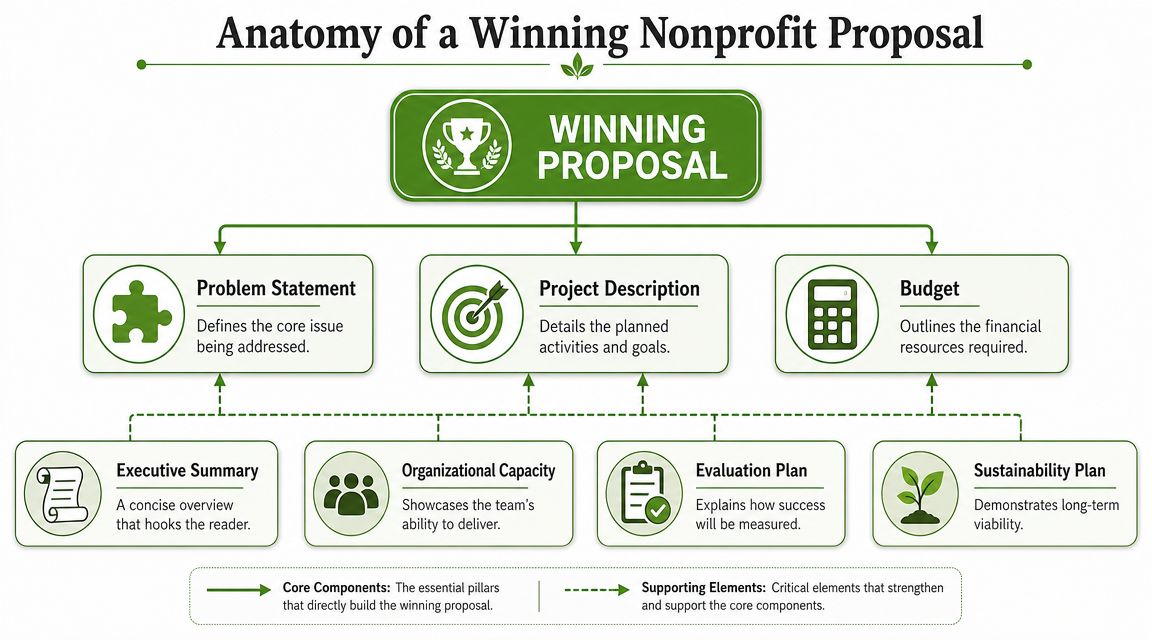
Executive summary and rationale
Teams often overwork the opening and underwork the middle. Reviewers notice the opposite.
Your executive summary should be brief and concrete. It has one job: help the reviewer understand the problem, your response, who benefits, and what the grant will support. If it reads like a mission statement, it's too vague.
The rationale or need statement carries more weight. It defines the problem in practical terms and explains why your organization is positioned to address it. Strong rationale sections name the gap clearly and keep the focus on beneficiaries, not the organization's internal ambitions.
A simple distinction helps:
| Section | What it should answer |
|---|---|
| Executive Summary | What are you asking for and why does it matter |
| Rationale | What problem exists and why is this project needed now |
Objectives and methodology
This is the core of the proposal. If these sections are weak, the rest won't save you.
Objectives should describe what will change. They should be measurable whenever the funder expects measurable outcomes. Methodology should explain how your team will create that change through specific activities, roles, and sequencing.
Good methodology usually includes:
- Activities linked to objectives so the reviewer can see why each action exists
- Responsible staff assigned to major tasks
- Outputs or deliverables tied to the work
- A work plan that shows timing and ownership clearly
Review friction usually comes from readers having to infer your logic. If they have to connect the dots for you, the proposal is doing too little work.
A useful internal test is this: could someone outside your team read the methodology and understand exactly what happens in month one, mid-project, and closeout? If not, keep tightening it.
Budget and evaluation
A budget isn't just a spreadsheet. It's proof that the project can be carried out as described.
Every major cost should trace back to an activity, staffing need, material requirement, or implementation step in the narrative. If the methodology promises intensive service delivery but the budget doesn't show the staff time or operating support to do it, reviewers will notice the mismatch.
The evaluation section closes the argument. It tells the funder how you'll know whether the work happened and whether it produced the intended result.
Here's the relationship that matters most:
| Proposal part | What it proves |
|---|---|
| Methodology | You know how to implement |
| Budget | You've resourced implementation realistically |
| Evaluation | You can verify what happened |
Capacity and sustainability
Many nonprofit teams tuck these sections near the end and treat them like formalities. That's a mistake.
Organizational capacity reassures the reviewer that the project won't collapse under its own ambition. Keep it specific. Name relevant program experience, delivery systems, partnerships, and staff roles.
Sustainability answers the question reviewers often wonder: what happens when this grant period ends? Sometimes the honest answer is continued fundraising, integration into an existing program, or phased adoption through partner support. That's fine. What doesn't work is pretending the project will somehow continue without labor, operating support, or planning.
Writing Your Proposal Narrative to Secure Funding
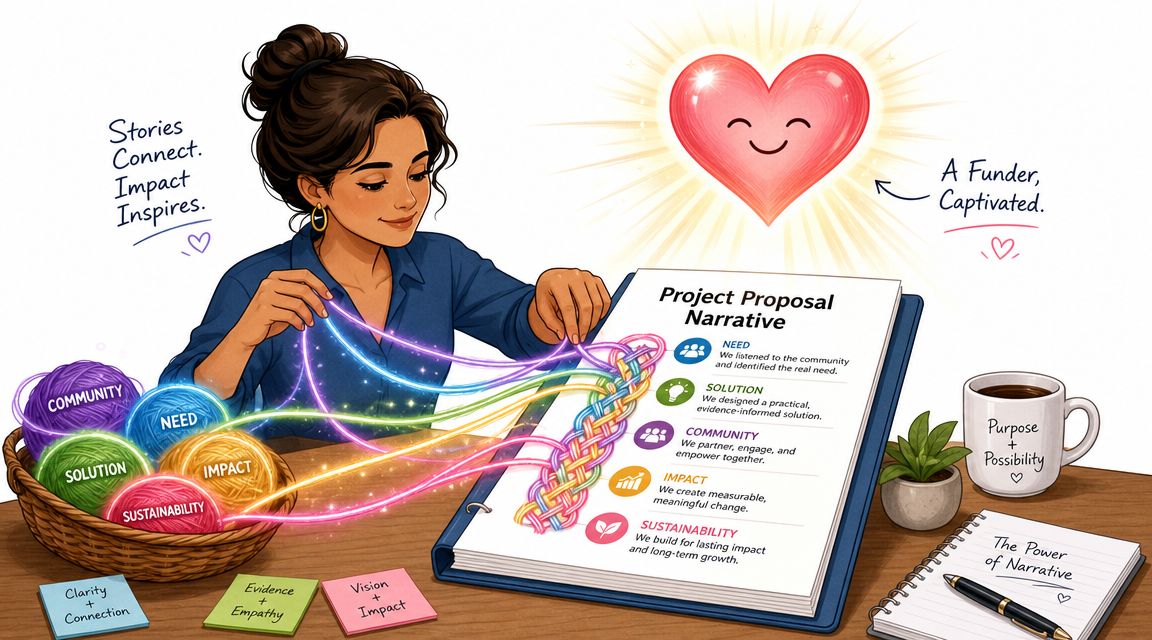
A clean structure gets your proposal read. A sharp narrative gets it taken seriously.
The biggest difference between weak and fundable writing is usually specificity. Vague proposals talk about helping, supporting, enabling, and improving. Strong proposals describe who will receive what, through which activities, on what timeline, and how the organization will know the work happened.
According to guidance in the Mastt project proposal template article, the most common failure in project proposals is vagueness, especially in methodology and budgeting. Reviewers need evidence that the project is executable and that resources match the delivery plan.
Replace broad claims with implementation detail
Here's what that looks like in practice.
| Weak narrative | Stronger narrative |
|---|---|
| We will support local families in crisis | We will provide case management, referral support, and direct service coordination for families facing immediate instability |
| The program will improve outcomes | The program will track service delivery, participation, and defined outcome indicators tied to project objectives |
| We need funding for staff and operations | Grant funds will support the personnel time and operating costs required to deliver the proposed activities |
Notice what changed. The stronger version doesn't invent impact numbers. It becomes clearer by describing the service model, workflow, and evidence plan.
Write objectives that can be reviewed
Objectives should survive reviewer scrutiny. That means they need a visible connection to actions and measurement.
A reliable formula is:
Objective = intended change + target group + timeframe + measurement approach
Examples of better phrasing:
Instead of “Increase community engagement”
Use “Increase participation in project activities among the target beneficiary group, tracked through attendance records and follow-up reporting”Instead of “Strengthen youth outcomes”
Use “Improve identified youth development indicators through structured programming, regular participation, and documented progress reviews”Instead of “Build organizational capacity”
Use “Strengthen internal delivery capacity through staff training, process documentation, and improved reporting systems tied to project implementation”
Field note: If an objective can't be measured in some visible way, it usually belongs in your vision statement, not your objectives section.
Budget narrative matters more than teams expect
Many proposals attach a budget and assume the numbers can speak for themselves. They can't.
Your budget narrative should justify why each cost is necessary for implementation. That doesn't require long paragraphs. It requires alignment.
Use short explanations like these:
- Personnel: Program staff time is required to coordinate outreach, enrollment, service delivery, and reporting.
- Supplies: Materials support direct participant services and scheduled project activities.
- Travel or local transport: Staff travel supports on-site delivery, partner coordination, or beneficiary access where applicable.
- Evaluation costs: Data collection and reporting support monitoring obligations and outcome verification.
A useful companion resource for sharpening language without making it sound overproduced is Documind's grant writing guide. It's especially helpful when you need to tighten narrative and remove soft phrasing.
Keep the story grounded
Funders don't just want competence. They want coherence. Your problem statement, objectives, activities, budget, and evaluation plan should all sound like they belong to the same project.
That's also where teams can use AI carefully. Ask it to summarize, tighten, or reorganize your own material. Don't ask it to invent evidence, outcomes, or community conditions you haven't documented.
A short walkthrough can help if you're revising a first draft in Word:
A quick editing pass that improves most drafts
Before you send the proposal for review, search for these words and inspect each use:
- Support
- Enhance
- Improve
- Expand
- Enable
- Address
Those words aren't wrong. They're often placeholders for missing detail.
Replace them with the underlying action. Train. Coordinate. Deliver. Refer. Track. Evaluate. Report. Those verbs show work. Reviewers trust work they can picture.
Formatting Your Proposal in Word for Readability
A strong proposal can still lose momentum if the document is hard to review. That's not cosmetic. It affects how quickly a reviewer can move through, annotate, and verify your submission.
The easiest fix is to treat Word as a structured document tool, not just a blank page.
Use Word features that reduce friction
Start with Styles. Apply Heading 1, Heading 2, and Heading 3 consistently. Word can then generate a navigation pane and a clickable table of contents if you need one. That helps reviewers jump to the budget, evaluation, or attachments without scrolling through the entire file.
Use page breaks, not repeated return keys, to start major sections. Return-key spacing breaks the moment someone edits text upstream.
A clean setup usually includes:
- Readable font choices such as Calibri or Arial
- Consistent margins across the full document
- Uniform heading hierarchy so the structure is obvious
- Tables for budgets and work plans rather than paragraphs of financial explanation
Make the document easy to scan
Reviewers often read proposals in bursts. They may skim first, then return to key sections. Help them.
A practical formatting checklist:
- Keep section headings specific so “Evaluation Plan” says more than “Monitoring”
- Use bullets where sequence matters such as deliverables, attachments, or milestones
- Avoid dense blocks of text in methodology and organizational background
- Label appendices clearly so attachments match references in the narrative
If you want examples of how Word formatting can improve highly technical reporting, even outside fundraising, this piece on how to achieve flawless security pentesting reports is useful for thinking about structure, readability, and reviewer flow.
Format for the reviewer, not the writer
Many teams format based on what feels comfortable to draft. That's the wrong standard.
Format based on how the proposal will be read. If a reviewer needs to compare your narrative to your budget and then check the evaluation section, the layout should make those moves easy. A well-structured grant proposal example can help you benchmark whether your current document is too dense, too loose, or just uneven.
The cleanest proposal format is the one that lets a reviewer find evidence fast.
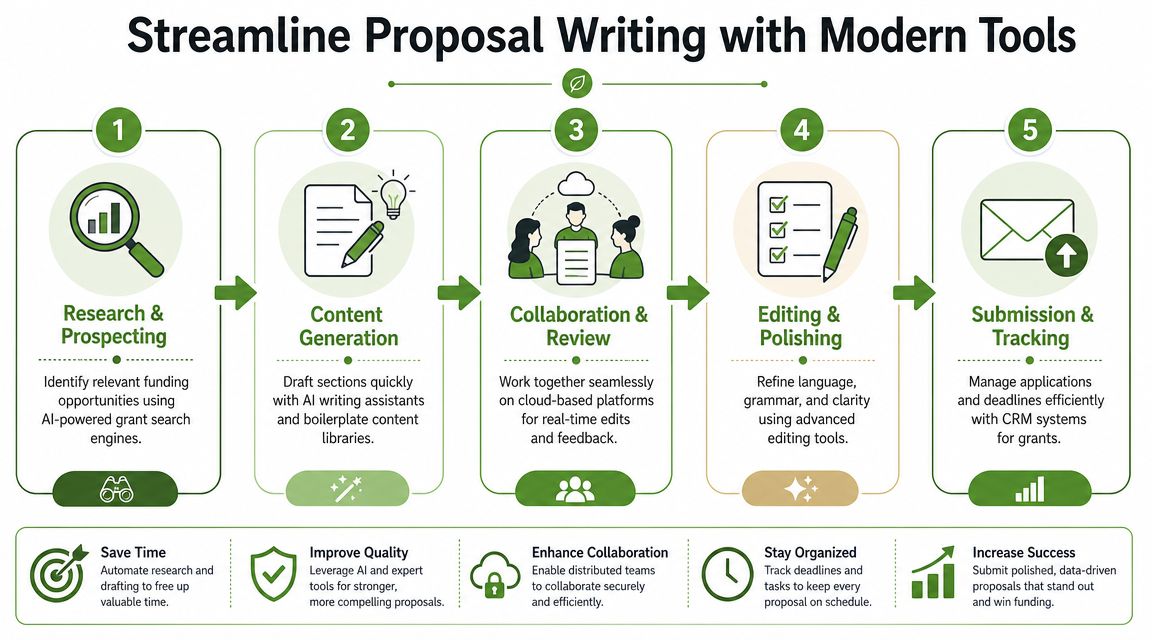
Streamline Proposal Writing with Modern Tools
Small nonprofits don't need more blank pages. They need systems that reduce repetitive work without weakening judgment.
That's where modern tools help. Not by replacing proposal thinking, but by speeding up the parts that consume staff time. Requirement extraction, outline building, revision control, first-draft assembly, and content reuse all move faster now than they did when Word templates were mostly static files passed around by email.
Microsoft now promotes Word business proposal templates with Copilot-assisted rewriting, review, and export workflows, which shows how proposal drafting has become more iterative and tool-assisted in current Word environments, as described on Microsoft's business proposal template page. The hard part for nonprofit teams isn't access to tools. It's keeping consistency, version control, and citation discipline when several people contribute.
Where AI actually helps
The strongest use cases are narrow and practical.
- Requirement parsing: Paste the RFP or funder guidelines into a tool and extract sections, attachments, and compliance items into a checklist.
- First-draft support: Use AI to turn approved program notes into a draft paragraph, then edit for accuracy and tone.
- Boilerplate reuse: Pull from organization history, program descriptions, and standard capacity language instead of rewriting familiar sections.
- Revision assistance: Ask for shorter wording, improved transitions, or clearer sentence structure after the facts are in place.
One option in this category is an automated grant proposal generator, which reflects the broader shift toward AI-assisted drafting workflows for nonprofits.
What not to automate blindly
AI creates the most risk in exactly the places grant proposals are most sensitive.
Don't let it generate:
| Risk area | Why human review is required |
|---|---|
| Outcomes claims | These must reflect your actual program design and evidence |
| Budget rationale | Costs must match your real staffing and implementation plan |
| Community need statements | These require local accuracy and context |
| Citations and references | Every supporting statement needs verification |
If your team uses AI inside Word or alongside it, assign one person to be the factual gatekeeper. That person checks every objective, timeline statement, budget note, and compliance detail before submission.
Build a lightweight workflow for a small team
You don't need enterprise software to work better. You need a repeatable process.
A practical nonprofit workflow looks like this:
- Store a master template in Word Online or another shared workspace.
- Create one intake sheet per proposal with funder rules, page limit, due date, attachments, and risks.
- Draft from source material only such as prior reports, approved program summaries, and current budgets.
- Use tracked changes for narrative review instead of separate emailed versions.
- Lock the final draft owner so one person controls the submission copy.
AI is useful when it shortens drafting time. It becomes expensive when it creates a clean-sounding paragraph that nobody fully verifies.
Your Proposal Submission Checklist and Timeline
A proposal usually goes off track long before the deadline day. The underlying problems often begin earlier. Missing attachments, unclear ownership, old boilerplate, budget revisions no one reflected in the narrative, or a draft that still doesn't match the funder's language.
That's why a checklist matters. Not because proposal writing is mechanical, but because the format has become standardized enough that decision-makers expect a familiar structure. The standardization of the project proposal format accelerated with Microsoft Office 97 in 1997, and guides from Wrike, HubSpot, and similar providers now converge on objectives, timelines, and budgets as core components, making the format a cross-industry best practice, as described in Wrike's project proposal template guide.
A practical backward timeline
Work backward from the due date, not forward from today.
A simple rhythm works well:
- Early stage: Confirm fit, page limits, required sections, and attachments.
- Middle stage: Draft methodology, work plan, budget, and evaluation together.
- Review stage: Check compliance, tighten language, and verify every attachment.
- Final stage: Convert, submit, confirm receipt, and save the final package.
Project Proposal Action Checklist
| Phase | Task | Status (To Do, In Progress, Complete) | Notes |
|---|---|---|---|
| Planning | Confirm funder eligibility and application requirements | ||
| Planning | Review page limits, formatting rules, and submission method | ||
| Planning | Assign proposal owner and section leads | ||
| Preparation | Gather organization boilerplate, staff bios, and attachments | ||
| Preparation | Collect current program details and draft budget inputs | ||
| Drafting | Complete problem statement and project rationale | ||
| Drafting | Write objectives, methodology, and work plan | ||
| Drafting | Build budget table and budget narrative | ||
| Drafting | Draft evaluation, sustainability, and risk sections | ||
| Review | Check consistency across narrative, timeline, and budget | ||
| Review | Proofread for clarity, compliance, and formatting | ||
| Review | Get an external read from someone not involved in drafting | ||
| Submission | Finalize attachments and file naming | ||
| Submission | Submit through portal or email and confirm receipt | ||
| Follow-up | Save final package and note reporting requirements |
Last review before you hit submit
Use one final pass for these questions:
- Does every major activity appear in the work plan and budget
- Does the evaluation section show how progress will be tracked
- Does the proposal reflect the funder's terminology
- Are all required attachments present and clearly labeled
A polished Project Proposal Template Word file won't win funding on its own. But it gives your team a reliable operating system. That's often what small nonprofits need most. Not more inspiration. More structure, fewer rewrites, and a cleaner path from blank page to submission.
If your team wants help moving from a static Word template to a more managed grant workflow, Fundsprout offers AI-assisted tools for funding search, requirement breakdowns, proposal drafting, timelines, and compliance tracking in one place.
Try 14 days free
Get started with Fundsprout so you can focus on what really matters.