Project Proposal Software: A Nonprofit's Guide for 2026
Discover how project proposal software helps nonprofits win more grants. This guide covers key features, benefits, and selection criteria for small teams.

Abdifatah Ali
Co-Founder
A grant deadline is ten days away. Your program director has outcomes in one Word file, your finance lead has the budget in a spreadsheet with three tabs and two warning colors, and someone on staff is still copying requirements from a funder PDF into a checklist. By the time the final draft comes together, nobody feels fully sure which version is current.
If that sounds familiar, you're not disorganized. You're working in the way many small nonprofits learned to work. You patch together email, documents, spreadsheets, calendars, and institutional memory. It gets the job done until the volume rises, a key staff member leaves, or a funder asks for a fast turnaround with strict compliance rules.
That's where project proposal software enters the picture. For nonprofits, it isn't just another app. It's a way to turn grant writing from a scramble into a repeatable operating process.
From Proposal Chaos to Controlled Workflow
A small nonprofit rarely loses time in one dramatic moment. It loses time in tiny, expensive ways.
A development manager hunts for the latest boilerplate. An executive director reviews the wrong attachment. A program lead answers a narrative question twice because the team didn't notice the overlap. Then, on submission day, someone realizes the budget language doesn't match the scope section.
That kind of friction is normal in a manual process. It's also risky. Grant proposals aren't only persuasive documents. They're records of what your organization says it will do, how it will do it, and what it will report later.
What the old workflow looks like
Most nonprofit teams start with tools they already have:
- Word for drafting: Good for writing, weak for managing multi-person review.
- Email for approvals: Fast at first, then impossible to track.
- Spreadsheets for deadlines: Helpful until nobody updates them.
- Shared drives for storage: Better than desktops, but still messy when naming conventions drift.
The result feels like cooking a large community meal with ingredients scattered across five kitchens. You can still serve dinner, but every dish takes longer, and mistakes are more likely.
Practical rule: If your team has to ask "Who has the latest version?" more than once per grant cycle, the problem isn't staff discipline. It's workflow design.
Project proposal software gives that workflow a home. Instead of treating each proposal as a brand-new document, it treats the work as a process with stages, owners, approvals, and reusable content.
The category itself is no longer niche, with market data from Future Market Insights' proposal management software market forecast valuing it at USD 3.2 billion in 2025 and projecting it to reach USD 9.0 billion by 2035, with a CAGR of 11.1%. That's a sign that organizations across sectors now treat proposal management as a core operational function, not a side task.
For nonprofits, the practical takeaway is simple. The same discipline that improves grant work also improves internal coordination. If you're already reviewing options for nonprofit project management software, proposal systems deserve a place in that conversation.
What changes when the workflow is controlled
A controlled workflow doesn't make grant writing effortless. It makes it visible.
You can see who owns each section, which funder requirements still need answers, what assumptions need review, and whether the narrative, budget, and attachments line up. That visibility is what lowers stress for small teams. It replaces heroic last-minute effort with a process people can trust.
What Is Project Proposal Software for Nonprofits
Think of project proposal software the way you'd think about accounting software.
A shoebox full of receipts can technically prove what you spent. It just doesn't help you organize, verify, reconcile, or report with confidence. Grant writing works the same way. A folder full of old proposals, templates, and notes contains useful material, but it doesn't create a dependable system.
Project proposal software is that system. For a nonprofit, it's the operational hub where funding opportunities, requirements, draft content, tasks, reviews, approvals, and later reporting can live in one structured workflow.
How it's different from a document editor
Word processors help you write sentences. Generic project management tools help you track tasks. Neither one was built specifically for the grant-seeking lifecycle.
Nonprofits usually need a system that can handle all of these at once:
- Funder requirements: Questions, attachments, deadlines, character limits, and eligibility notes
- Reusable institutional content: Mission, history, program descriptions, staffing, evaluation methods
- Cross-functional input: Program, finance, leadership, and sometimes board review
- Submission memory: What was sent, when it was sent, and what was promised
- Post-award continuity: Reporting deadlines, deliverables, and funder-specific obligations
A general-purpose tool can support parts of that work. Purpose-built project proposal software is designed around the whole chain.
Why the category changed
Historically, proposal software moved from basic drafting tools to workflow-driven systems with templates, approvals, and version control. Fortune Business Insights notes that by 2025, software made up 59.6% of the proposal management market in one major forecast, reflecting a broader shift toward formalized and scalable proposal processes in place of more ad hoc service-heavy approaches, as described in its proposal management software market analysis.
That shift matters for nonprofits because grant work has become more structured. Funders ask for clear scope, methodology, resources, budget, evaluation plans, and supporting documentation. You can't manage that well if your system treats every proposal as one long block of text and a handful of attachments.
A proposal platform should help your team remember what it already knows, not force staff to rebuild that knowledge every deadline cycle.
What this looks like in a nonprofit office
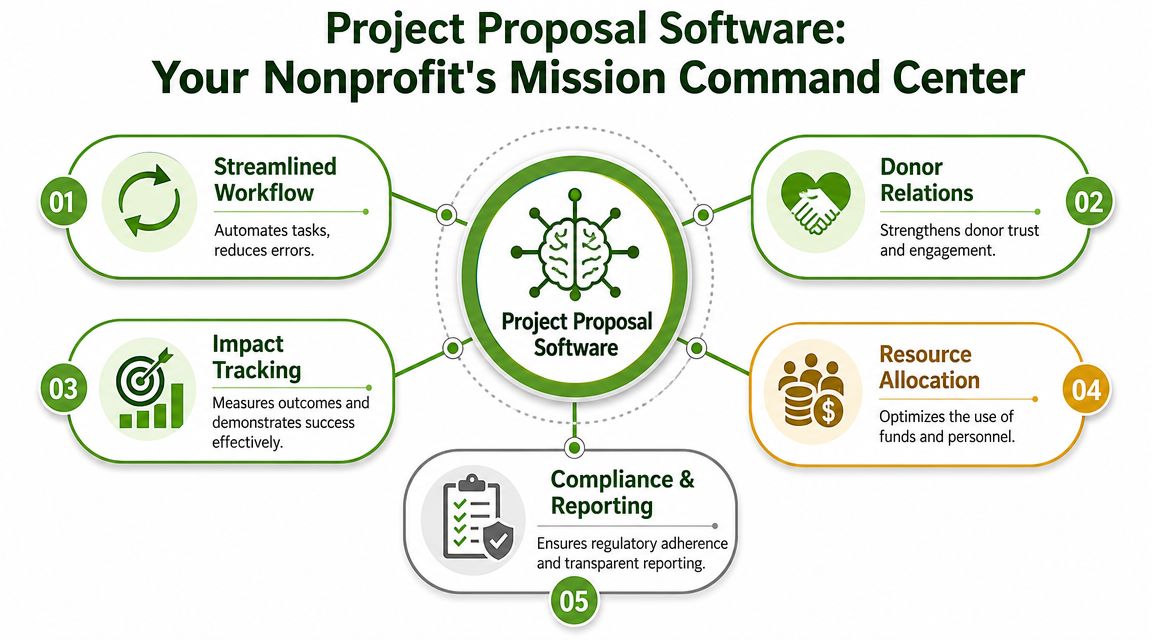
In practice, the software acts like a mission command center.
Your development lead can track active grants. Your program manager can update outcomes language in one approved place. Your finance lead can review budget assumptions without digging through email threads. Your executive director can approve the final submission inside the same workflow instead of searching inboxes.
For a small team, that's the core value. It doesn't just organize files. It reduces rework, clarifies responsibility, and makes institutional knowledge easier to keep when staff wear multiple hats.
Core Features That Replace Manual Workflows
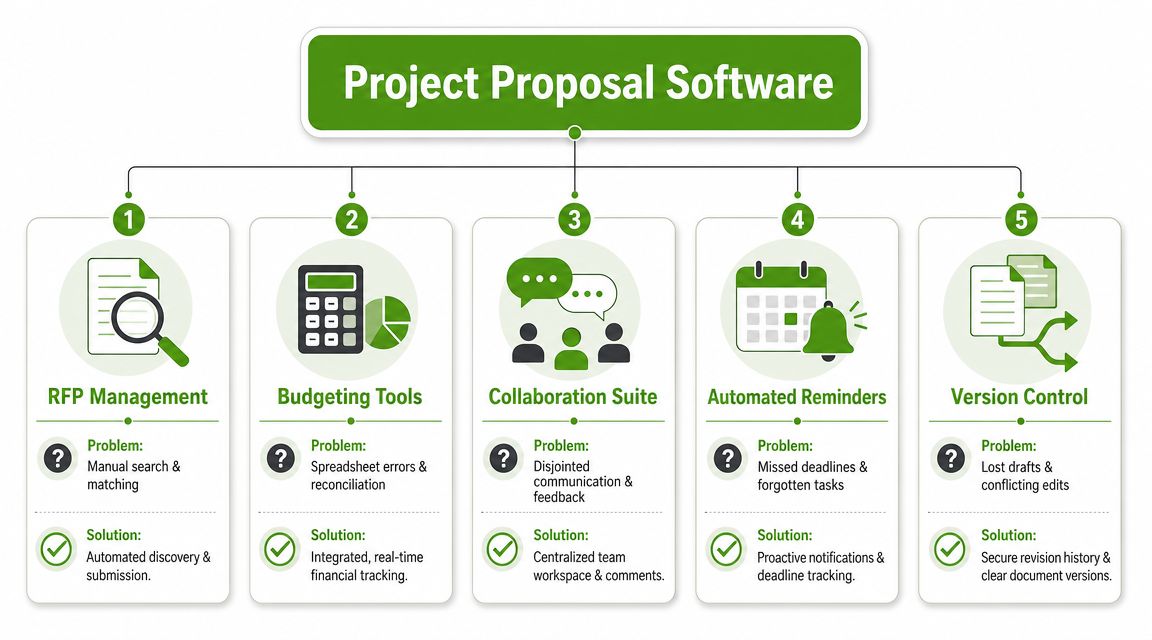
The easiest way to understand project proposal software is to match each feature to a frustrating task your team already does by hand.
If a tool adds bells and whistles but doesn't remove manual labor, it won't help much. The right features should replace repetitive work, reduce avoidable mistakes, and make collaboration easier for people who already have full jobs.
Modular sections instead of one giant draft
Strong proposal systems don't treat an application as a single monolithic document. They break it into reusable, reviewable parts.
According to Inventive's discussion of software proposal templates, effective proposal software relies on a modular document model built from sections such as executive summary, scope, milestones, and related content blocks. That structure supports template reuse, section-level change tracking, and role-based collaboration.
For nonprofits, that means you can separate content like:
- Organization overview
- Need statement
- Program design
- Implementation timeline
- Evaluation plan
- Budget narrative
- Attachments and appendices
Each section usually has a different owner. Program staff know service delivery. Finance knows allowable costs. Leadership knows strategic framing. A modular system lets each person review the part they understand.
Requirement capture instead of manual checklist building
Many grant teams still read a long notice of funding opportunity and build their own checklist in a spreadsheet or notebook. That works, but it's fragile.
A proposal platform should help your team capture:
- submission rules
- due dates
- attachment lists
- eligibility notes
- required narrative prompts
- review checkpoints
Without that structure, important requirements stay buried in PDFs. With it, the software turns instructions into tasks and sections people can effectively manage.
Content libraries instead of rewriting boilerplate
Most nonprofits answer some version of the same questions again and again. Who are you? What community do you serve? What's your program model? How do you measure success?
A content library lets you save approved narrative blocks and adapt them for specific funders. That doesn't mean copying and pasting blindly. It means starting with vetted language instead of a blank page.
A healthy library usually includes:
| Content type | Example use | Why it helps |
|---|---|---|
| Organization profile | Mission, history, geography | Keeps core facts consistent |
| Program descriptions | Service model, target population | Speeds up repeat applications |
| Evidence and evaluation language | Outcomes, methods, reporting approach | Reduces rushed drafting |
| Standard attachments checklist | Letters, budgets, policies | Prevents missing items |
Collaboration tools instead of email chains
Email is good for conversation. It's terrible for controlled review.
When people comment in separate files, you get duplicate edits, conflicting suggestions, and unclear approvals. A collaboration layer inside project proposal software gives your team one place to comment, assign revisions, and mark work complete.
That becomes especially useful when grants touch compliance. If you're also tightening your reporting systems, resources on grant compliance tracking software can help you think beyond submission and into post-award accountability.
The strongest workflow isn't the one that writes fastest. It's the one that makes review visible before mistakes become commitments.
Version control instead of naming files Final v7
Every nonprofit has lived through some form of this file name: FINAL_GrantNarrative_REALfinal_v3_approved.
Version control solves a very human problem. People work under pressure. They open the wrong file, make offline edits, or overwrite approved language. Good proposal software preserves revision history and makes the current version obvious.
That matters not only before submission, but after. If a funder asks what you proposed, who approved it, or why wording changed, your team shouldn't need detective work to answer.
Compliance cues instead of memory-based follow-through
For small nonprofits, proposal work doesn't stop when the award arrives. The application becomes the baseline for reporting, deliverables, and renewals.
That's why the best systems don't only support writing. They help carry forward assumptions, commitments, and documentation so the proposal can inform what happens next.
The Real-World Benefits for Your Mission
Features matter, but your executive director doesn't need software because it has a comment panel or a template library. Your organization needs a better process because grant work affects staff time, credibility, and mission delivery.
Before and after the switch
Before a structured system, a proposal deadline often reshapes the entire week. Program staff stop program work to hunt for numbers and narratives. Finance scrambles to align the budget with a late-stage draft. Leadership reviews material at the last minute because nobody had a clean approval process.
After the switch, the work still takes effort. But the effort moves earlier, where it belongs. Tasks are assigned sooner. Approved language is easier to find. Reviews happen in order. The final days are used for refinement, not reconstruction.
Three benefits that show up quickly
The first benefit is staff efficiency. Small nonprofits can't afford to have experienced staff spending hours on version hunting, duplicate drafting, and administrative chasing.
The second is proposal quality. When teams work from organized content and a structured review path, the final submission is usually more consistent. Scope, narrative, and budget are more likely to tell the same story.
The third is compliance continuity. A clear record of what your team submitted makes it easier to prepare for reporting, renewals, and funder questions later.
A messy proposal process doesn't stay in fundraising. It spills into program delivery and reporting.
Here's a simple comparison:
| Before | After |
|---|---|
| Knowledge lives in staff inboxes | Knowledge lives in a shared system |
| Review happens late | Review happens throughout the workflow |
| Boilerplate gets copied from old files | Approved content is stored and reused intentionally |
| Submission is the finish line | Submission becomes the start of cleaner reporting |
A short explainer can help your team visualize how proposal workflows connect to broader project execution:
What this means for mission work
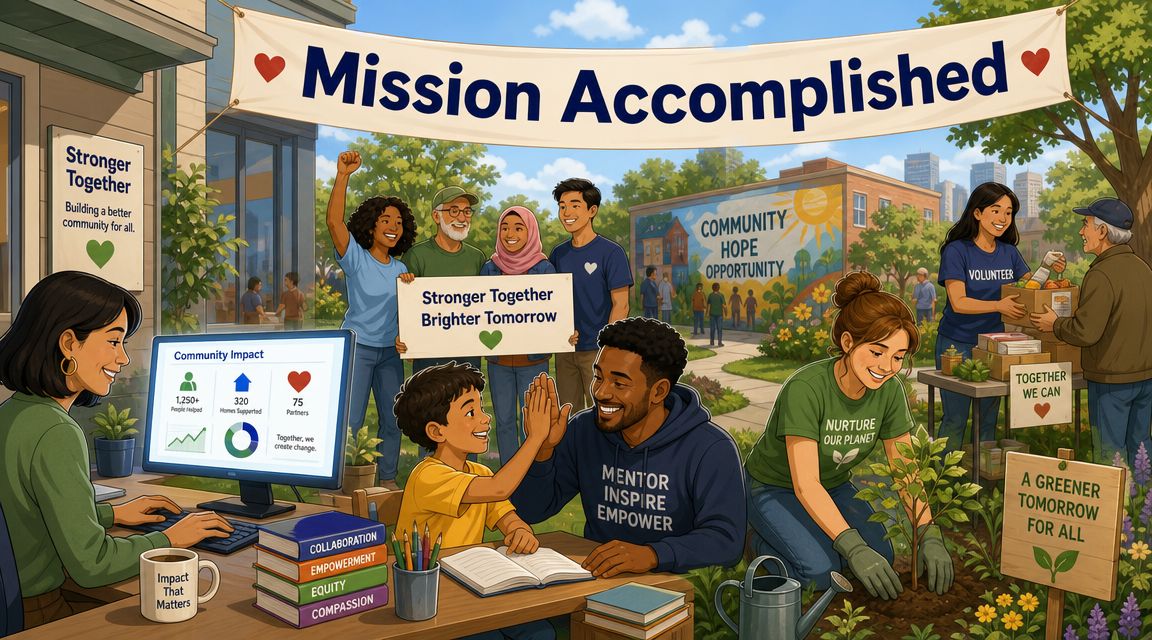
The most important outcome isn't convenience. It's capacity.
When your proposal process becomes more orderly, staff can spend less energy managing documents and more energy strengthening program design, gathering community insight, and stewarding funder relationships. That's the shift most nonprofits are really after. Not more software for its own sake, but less operational drag around critical funding work.
How to Choose the Right Software for a Small Nonprofit
Not every proposal tool fits a small nonprofit. Some were built for enterprise sales teams responding to corporate RFPs. Others assume you have a dedicated operations person, a large budget, or time for a long implementation.
Small teams need something narrower and more practical. If you're sorting through your broader software stack, this 2026 guide to nonprofit software gives helpful context on how finance, operations, and fundraising tools fit together.
Start with fit, not feature volume
A long feature list can be distracting. The better question is whether the tool matches how your team works.
Look for a system that supports grant-seeking workflows such as deadline tracking, reusable narrative sections, internal review, attachments management, and post-submission records. If most of the product language centers on sales quotes, deal desks, or commercial contracts, it may not fit your environment.
Use this evaluation checklist
| Criteria | What to Look For | Why It Matters for Small Teams |
|---|---|---|
| Affordability | Clear pricing, understandable limits, no surprise add-ons | Small nonprofits need budget predictability |
| Ease of use | Clean interface, short learning curve, simple setup | Staff don't have time for a complicated rollout |
| Grant workflow support | RFP requirements, narrative sections, deadlines, approvals | Generic tools often miss nonprofit-specific needs |
| Integration potential | Ability to work alongside your CRM, accounting, or document tools | Reduces double entry and manual reconciliation |
| Scalability | Useful now, but still workable as grants and staff increase | Prevents another software switch too soon |
| Support quality | Real onboarding help, training resources, responsive support | Small teams often don't have in-house admin capacity |
Questions worth asking in a demo
Some questions reveal more than a polished presentation:
- How does the system handle reusable content? Ask to see how one approved paragraph gets updated and reused.
- What does review look like? Watch how comments, approvals, and revision history work in practice.
- Can it support reporting later? Submission is only half the lifecycle.
- How much setup is required? A strong tool shouldn't demand months of configuration.
- Who on our team will use it? If the answer is "only one person," adoption may stall.
Don't buy software for the team you wish you had. Buy for the team you have right now.
A simple selection test
If you're comparing two tools and feeling stuck, use this screen.
Choose the one that makes it easier to answer these questions without searching across multiple systems:
- What is due next?
- Who owns each part?
- Which version is approved?
- What exactly did we promise the funder?
- What do we need later for reporting?
If a product can't make those answers visible, it probably won't reduce much friction.
Implementing Your New Proposal Workflow
Buying software doesn't fix a process by itself. Teams have habits. People store favorite boilerplate in personal folders. Approvals happen informally. Program staff may still send key details by email because that's what they've always done.
Adoption works better when you change the workflow in small, visible steps.
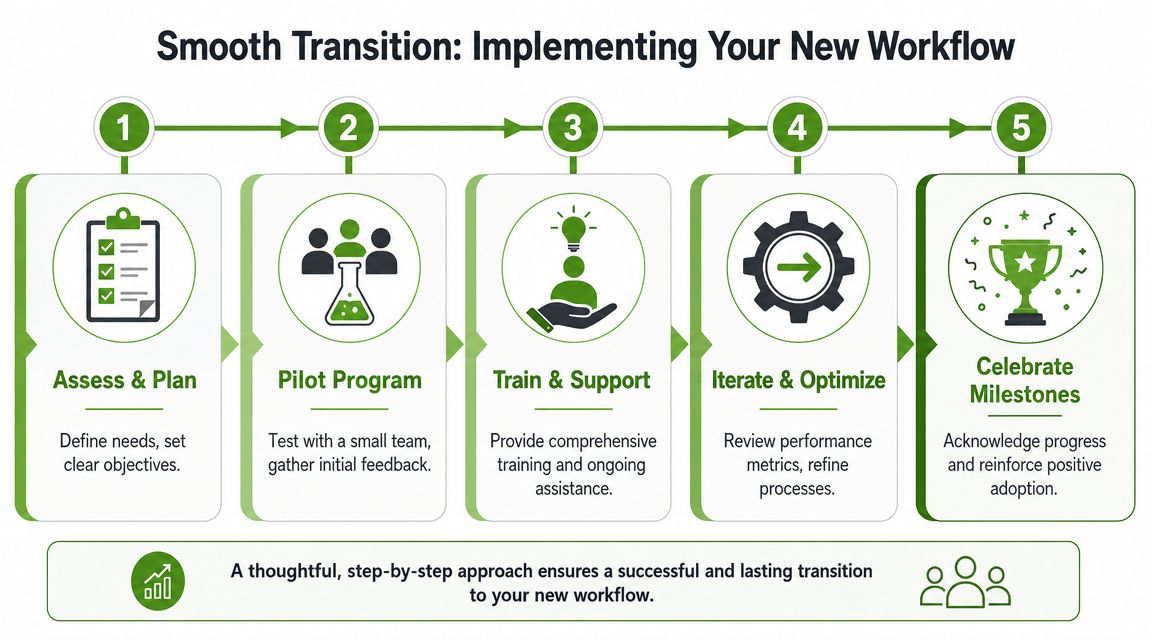
Phase one brings everything into one place
Start by centralizing active opportunities and core materials. That includes open grants, saved funder guidelines, past winning proposals, standard attachments, approved organization language, and current budget templates.
Don't try to migrate every historical file at once. Move only what your team will use in the next proposal cycle. Early wins matter more than archive perfection.
Phase two turns requirements into work
Once an opportunity is in the system, translate funder requirements into a usable plan.
That usually means:
- Creating sections: Match narrative prompts to discrete content blocks
- Assigning owners: Program, finance, leadership, and development each get clear responsibilities
- Setting internal deadlines: Don't rely only on the funder's due date
- Listing dependencies: Identify what data, attachments, or approvals each section needs
This step is where many teams feel immediate relief. The grant stops being a giant looming object and becomes a sequence of manageable tasks.
Phase three changes review habits
Now move drafting and review into the software itself. Resist the urge to export everything back into email too early.
Have staff comment inside the platform, request revisions there, and mark approvals in the same place. If someone sends feedback by email, copy it into the system so the record stays complete.
One source of truth beats five well-intentioned side conversations.
Phase four carries the work past submission
After submission, keep going. Record what was sent, the final language, the submitted budget, and any stated assumptions or reporting obligations.
That post-submission record is what prevents shelfware. The platform becomes useful not only for the next application, but for grant management and renewal planning too.
A rollout approach that small teams can sustain
A simple rollout often works better than a dramatic launch:
- Pilot the system on one live opportunity.
- Build a small content library from existing approved materials.
- Use one shared review process across the pilot team.
- Hold a short debrief after submission.
- Refine the workflow before the next cycle.
That approach respects limited staff time and reduces resistance because people can see the process improve in real work, not just training sessions.
How AI Supercharges Your Proposal Process with Fundsprout
Traditional project proposal software organizes the work. AI can help move the work forward.
That distinction matters. A good platform gives your team structure, but AI can help with opportunity matching, requirement analysis, first-draft generation, and reuse of organizational knowledge across proposals. For nonprofit teams with limited writing bandwidth, that's a meaningful shift.
One example is Fundsprout's guide to AI for grant writing, which describes how AI can support grant discovery, drafting, and workflow management across the funding lifecycle. In practice, tools in this category can scan for relevant opportunities, turn funder requirements into a structured outline, and generate draft sections using your organization's own materials.
That doesn't remove human judgment. It raises the value of it.
The trust question matters more than speed
As AI-generated content becomes more common, the better question isn't "How fast can this tool write?" The more useful question is whether it helps your team surface assumptions, preserve reviewer input, and produce a defensible version-controlled submission. That's the concern highlighted in Portant's discussion of software proposal practices in 2026.
If you're evaluating AI writing more broadly, RewriteBar's AI writing tool guide is a useful outside reference for understanding how writing assistants differ in practice.
Where AI helps a small nonprofit most
For a lean team, AI is most helpful when it supports real bottlenecks:
- Finding likely-fit opportunities
- Extracting requirements from dense funder documents
- Drafting repeatable sections from approved source material
- Keeping citations, assumptions, and revisions visible for review
Used well, AI doesn't replace the voice or accountability of your organization. It gives your staff a stronger starting point and a cleaner process for review.
If your team is still stitching together grant proposals across documents, spreadsheets, and inboxes, Fundsprout is worth a look. It's an AI-powered grant success platform built to help nonprofits find relevant funding, draft proposals using their own materials, track deadlines, and maintain the audit trail needed for reporting and renewal work.
Try 14 days free
Get started with Fundsprout so you can focus on what really matters.