Nonprofit Project Management Software: Boost Efficiency and Impact
Discover how nonprofit project management software can streamline operations, boost collaboration, and measure impact.

Abdifatah Ali
Co-Founder
Most project management software on the market is built with one thing in mind: profit. That’s a huge problem for mission-driven organizations. When your success is measured in impact, not income, forcing your work into a rigid, profit-focused framework just doesn't fly. It often creates more headaches than it solves.
Why Generic Project Tools Fail Nonprofits

Here's a simple way to think about it: using a generic tool for nonprofit work is like trying to perform surgery with a Swiss Army knife. It's a versatile little gadget, sure, but you wouldn't want it anywhere near a high-stakes operation that demands precision. You'd want a scalpel.
Nonprofits operate in a specialized world that demands specialized tools. Standard platforms are designed for linear, commercial projects—tracking billable hours, managing product launches, and hitting sales targets. They simply weren't built for the complex, multi-layered reality of nonprofit operations, and that mismatch causes a ton of friction.
The Disconnect Between For-Profit and For-Purpose Workflows
At its heart, the issue is a difference in DNA. A for-profit company measures success in revenue and market share. A nonprofit measures success in lives changed, communities strengthened, and missions fulfilled. These are two completely different operational languages, and they require different toolsets.
Generic software just doesn’t speak the language of nonprofits. It's missing the fundamental architecture needed to handle the unique challenges that define your work.
- Complex Grant Management: Can a standard tool juggle multiple grant deadlines, each with its own set of reporting rules and restricted funds, all in one clear view? Nope.
- Volunteer Coordination: Are these platforms built to manage the schedules, skills, and communication needs of a diverse, ever-changing team of volunteers? Not a chance.
- Stakeholder Reporting: They’re great at spitting out financial KPIs, but they fall flat when you need to show the nuanced impact metrics that boards, donors, and community partners care about.
- Compliance and Accountability: For-profit tools simply lack the features to keep you aligned with the strict regulations and transparency demands of the nonprofit sector.
The right nonprofit project management software isn't just an operational upgrade; it's a strategic asset for maximizing mission delivery. It bridges the gap between daily tasks and long-term impact.
The True Cost of Inefficient Tools
When you try to jam a generic tool into a nonprofit workflow, you end up with a messy patchwork of spreadsheets, manual workarounds, and scattered email threads. This isn't just inefficient; it's risky. It leads to missed grant deadlines, compliance errors, and burned-out staff. Our comprehensive guide on non-profit project management dives deeper into these challenges and offers practical solutions.
There's a reason the market for specialized nonprofit software is booming. The sector is expanding at a compound annual growth rate of nearly 9.5%, which shows a clear shift away from one-size-fits-all solutions. More and more organizations realize that investing in a purpose-built tool is a non-negotiable part of effective program management.
At the end of the day, generic software forces you to work for the tool. Purpose-built nonprofit project management software makes the tool work for your mission.
Key Features That Drive Nonprofit Success
Let's move past the abstract and get into what really matters. The true power of a great nonprofit project management software isn't just a long list of features; it's about having the right features—tools specifically built to solve the unique, often messy, problems nonprofits face every day.
Think of it this way: the real test isn't if a tool can make a pretty chart. It's whether it can handle the controlled chaos of a year-end fundraising campaign while you're simultaneously launching a new community program. These are the mission-critical capabilities that separate a useful tool from a transformative one.
Grant and Fund Tracking
For most nonprofits, grants are the fuel that keeps the engine running. But managing them? That's a different beast altogether. A generic project tool might let you pop in a deadline, but it won't help you track restricted funds, watch your spending against specific grant budgets, or pull together the detailed financial reports your funders demand.
This is where specialized software really proves its worth. Picture an environmental group juggling three different grants: one from a federal agency for a river cleanup, another from a private foundation for educational workshops, and a third from a corporate partner for volunteer gear. Each grant has its own rules, reporting schedules, and budget lines.
With a platform built for this reality, a program manager can:
- Allocate every expense to the right grant: Tagging staff hours, supply costs, and travel directly to the correct funding source becomes simple. No more spreadsheet gymnastics.
- See budget burn rates in real-time: A quick glance at a dashboard might reveal that 75% of the federal grant is gone, but the project is only 50% complete. That's an early warning to course-correct before it's too late.
- Generate funder reports in minutes: Instead of spending days piecing together data, you can create accurate financial summaries for each grant with just a few clicks.
Volunteer and Team Coordination
Your volunteers are your superpower, but getting everyone organized can feel like herding cats. A standard corporate tool just isn't designed for the constantly shifting schedules, varied skill sets, and unique communication needs of a volunteer workforce.
Take a community food bank that depends on 200+ volunteers for its weekly distributions. They need a system that does way more than just assign a task.
A robust nonprofit project management software becomes the single source of truth for your entire team—staff, volunteers, and even board members. It gets everyone on the same page, no matter where they are or what their role is.
The right platform gives volunteers a dedicated portal to sign up for shifts, log their hours, and access key documents. This frees up the volunteer coordinator to see who's available at a glance, send out quick updates via text or email, and make sure every critical role is covered for the big event. It turns a logistical headache into a smooth, reliable process.
Integrated Program and Donor Management
The most forward-thinking solutions connect the dots between your programs and your fundraising. It’s a simple truth: your programs are what inspire people to donate, and their donations are what make those programs happen. When these two functions live in separate worlds, you're flying blind. It's nearly impossible to show a donor exactly how their gift made a tangible difference.
When you link your project data with your donor information, you create a powerful cycle. Project management tools show how the work gets done, and linking them with donor data explains why it matters. To see this in action, many organizations explore the best CRM software for nonprofits to understand how donor relationships and project execution can feed each other.
This integrated view builds incredible trust and transparency. Your development team can now confidently tell a major donor that their $10,000 gift directly funded 5,000 meals or provided 200 hours of tutoring for local kids. That kind of specific, powerful storytelling is what turns a one-time donor into a lifelong supporter.
How Today's Tools Can Supercharge Your Mission
Technology isn't just some back-office utility anymore; it's right at the heart of what makes a nonprofit successful. For those of us in the sector, three major shifts in technology are changing the game, helping organizations become faster, smarter, and more impactful. This isn't about chasing fads—it's about using practical, powerful tools to do more good.
The biggest game-changer has been the move to the cloud. Think about it: no more worrying about server closets, last-minute software updates, or trying to access a critical project file while you're at a community event. Cloud-based nonprofit project management software handles all that messy IT stuff for you, giving you a more flexible and affordable way to run your operations.
This shift means your whole team—whether they're at a desk, at home, or out in the field—is always on the same page, looking at the same real-time information. You get top-tier security and reliability without the sky-high price tag, which is a massive win for any budget-conscious nonprofit.
Putting AI and Automation to Work
The second big trend is seeing artificial intelligence (AI) and automation become genuinely useful. This isn't about futuristic robots taking over. It's about making your day-to-day work smarter. For instance, AI can look at your past project data and flag potential bottlenecks in your next fundraising campaign, giving you a heads-up so you can adjust your plans before things go sideways.
Automation is the hands-on partner to AI. It’s here to take all those repetitive, soul-crushing tasks off your team's plate.
- Automated Reporting: Imagine a grant report that generates itself instead of you spending hours pulling numbers from spreadsheets. That's what automation does.
- Smart Reminders: The system can give team members an automatic nudge when a deadline is approaching, so nothing important gets missed.
- Workflow Triggers: As soon as a new grant is logged, a workflow can kick off automatically, creating a project plan and assigning the first round of tasks.
These tools free up your people from mind-numbing admin work, letting them focus on the strategic, creative stuff that actually moves your mission forward.
The Power of Connecting Your Systems
Finally, the trend that pulls it all together is the shift toward integrated platforms that knock down the walls between your departments. For too long, fundraising, program management, and finance have all lived on their own separate islands. This created a choppy, incomplete picture of how the organization was really doing and made it a nightmare to show a donor exactly how their contribution made a difference.
An integrated platform gives you a complete, 360-degree view of your organization. It connects every dollar you raise directly to the good you're doing in the world, creating a powerful feedback loop between your fundraising and your programs.
Modern nonprofit project management software is finally bridging these gaps. When your fundraising CRM is talking to your project management tool, you can see in an instant which campaigns are paying for which programs. This kind of unified view is a goldmine for making smart decisions and telling powerful, data-backed stories to your supporters.
These changes aren't just on the horizon; they're happening now. The latest market analysis shows that cloud-based systems already make up 61.3% of nonprofit software, and the use of AI in project management is expected to jump by 16.3% every year. The writing is on the wall: nonprofits are moving toward smart, connected platforms that bring program management and fundraising together to improve reporting and scale their impact. To dig deeper into these shifts, you can check out the full nonprofit software market analysis.
Choosing the Right Software for Your Organization
Picking the right project management software for your nonprofit isn’t like buying office supplies; it’s more like hiring a new program director. This isn't just about features on a webpage. It’s a strategic choice to find a true partner for your mission—a tool that not only solves today's challenges but can also scale with you as your impact grows.
To make a decision you'll still be happy with in a year, you need a clear, structured approach. It's easy to get sidetracked by flashy demos, so it’s crucial to ground your evaluation in what your organization actually needs to get work done. This helps you tune out the marketing noise and find a solution that genuinely supports your long-term vision.
Beyond the Feature Checklist
A long list of features can be misleading. The real test is how a platform fits into your daily reality. A tool might have incredible reporting capabilities, but if it requires a data science degree to pull a simple grant summary, it’s going to collect dust.
Usability is everything. The software has to feel intuitive for everyone, from your tech-savvy development coordinator to the occasional volunteer who just needs to log their hours. A clunky, confusing interface is the fastest way to kill adoption and waste your investment.
You also need to think about the future. Will the software you pick today handle more complex programs, a bigger team, and stricter grant-tracking demands in three years? Choosing a scalable platform from the start means you won't have to go through this whole process again when you outgrow a more basic tool.
Vetting Your Potential Software Partner
Think of software vendors less like salespeople and more like long-term partners. Their familiarity with the nonprofit world is a huge green flag. A vendor who understands the unique challenges of fund accounting, grant cycles, and donor stewardship will deliver more relevant updates and helpful support than one that primarily serves corporate clients.
When you're talking to vendors, dig into these key areas:
- Integration Capabilities: How well does it play with the tools you already use? You need it to connect smoothly with your accounting software, donor CRM (Salesforce or Bloomerang), and email marketing platforms. Manually copying data between systems is a massive time-drain and a magnet for errors.
- Total Cost of Ownership: The price on the website is just the beginning. Be sure to ask about implementation fees, data migration costs, training packages, and any ongoing support charges. Sometimes a low initial price can hide much higher long-term costs.
- Vendor Support: What happens when something goes wrong on the day a grant report is due? Find out what their support system looks like. Can you get a real person on the phone, or are you stuck with email tickets and a 24-hour response time? A reputation for responsive, knowledgeable support is worth its weight in gold.
Choosing a software provider is a commitment. Prioritize vendors who demonstrate a genuine investment in the nonprofit community and can provide case studies or testimonials from organizations similar to yours.
Making the right technology decision often involves weighing different trends and approaches, from adopting cloud-based systems to leveraging AI.
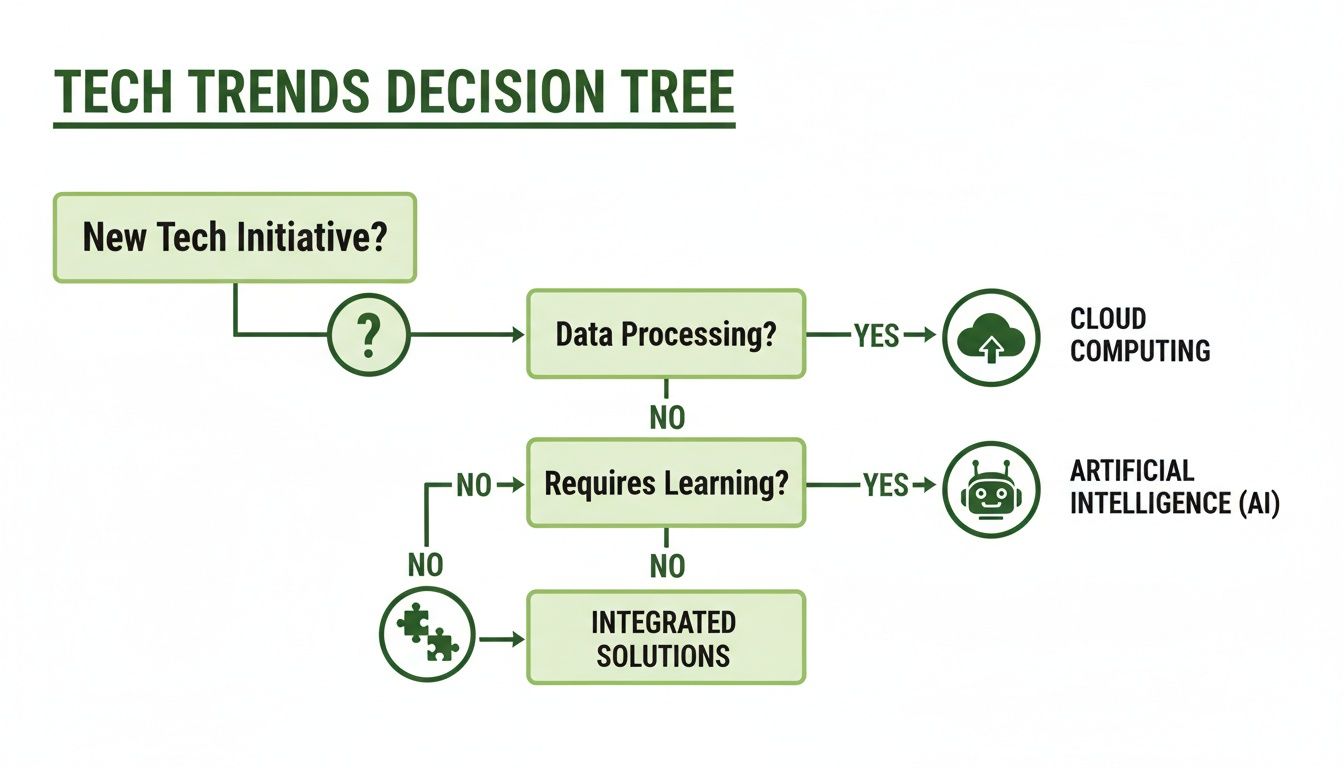
As the chart shows, these choices are interconnected. The goal is to find a path that aligns with your organization's specific operational needs and strategic goals, creating a cohesive tech environment.
To help you stay organized during your search, we've put together a simple checklist. Use this framework to compare different platforms and vendors consistently.
Software Selection Checklist for Nonprofits
This checklist is your guide to ensuring you cover all the bases, helping you move from a list of potential options to the one best-fit solution for your team.
The Power of Specialized Integration
Ultimately, you want to build a connected tech ecosystem, not a collection of standalone tools. A great project management platform is a solid start, but its impact skyrockets when it talks directly to your other critical systems. For instance, integrating project management with your grant management workflow gives you a seamless view from application to final report.
This connection is a game-changer for compliance. When your project tasks, timelines, and expenses are automatically linked to specific grant deliverables, you create an airtight audit trail. To see how these systems work hand-in-hand, check out our guide on nonprofit grant management software.
Building this bridge ensures every action is aligned with funder expectations, which radically simplifies reporting and builds the kind of trust that leads to long-term support.
Getting Your Team On Board: A Guide to Successful Software Adoption

Here's the hard truth: the most powerful nonprofit project management software is completely worthless if nobody uses it. Success isn't about fancy features; it’s measured by how deeply your team actually integrates the new tool into their daily work. This isn't really a tech problem. It's a people problem—a classic change management challenge that demands a thoughtful, human-first strategy.
Think of it like this: you've just invested in a brand-new toolkit for your community garden. If you just toss it in the shed without showing anyone how to use the new gear or explaining why it's better than the old, rusty shovels, everyone will just stick with what they know. Software is no different. A smooth rollout depends entirely on a smart plan that can turn skepticism into genuine enthusiasm.
Assemble Your Champions
Your very first move should be to create a small, dedicated implementation team. This group will be your navigators, guiding the rest of the organization through the transition.
Make sure this team is a true cross-section of your nonprofit. You'll want a tech-savvy staff member, a program manager who knows the daily workflows inside and out, and maybe even a key volunteer. Their mission is to own the entire process, from figuring out how to move data from old spreadsheets to mapping out the training schedule. They become your internal experts—the go-to people who can answer questions and advocate for the new system.
Always Start with "Why"
People are naturally resistant to change. The biggest hurdle you'll face is the fear that a new tool just means more work. To get past this, you have to communicate the benefits clearly and often, focusing not on what it does for the organization, but what it does for them.
Frame the conversation around their specific headaches. Instead of saying, "This will improve our reporting efficiency," try this: "This will save you three hours every month when you're scrambling to finish that grant report." It’s all about what's in it for them.
- For your Program Managers: "You'll finally have a live view of your project budget, so no more nasty surprises at the end of the month."
- For your Development Team: "Imagine pulling real-time impact numbers for a donor update without having to chase down three different people."
- For your Volunteers: "You'll get a simple, single place to sign up for shifts and see exactly where we need your help the most."
When you shift the message like this, the software stops feeling like a mandate from above and starts feeling like a tool that actually makes their lives easier.
Make Training Practical and Continuous
A single, one-off webinar is not training. It's a checkbox. Effective training needs to be hands-on, tailored to different roles, and ongoing. Start with the basics for everyone, then hold specialized sessions for specific teams that dive deep into the features they'll use every day.
The real goal of training isn't just teaching people where to click. It’s about building their confidence and showing them precisely how this software solves the problems they face day in and day out.
Keep an eye out for your internal "champions"—those early adopters who just get it. Empower them to become mentors for their colleagues. This kind of peer-to-peer support is often far more effective than any formal training session.
With 82% of organizations already using project management software to work more efficiently, a solid adoption plan is what separates a wasted investment from a genuine leap forward. You can check out more project management statistics and trends to see just how other nonprofits are making these tools work for them.
How to Measure the Real-World Impact of Your New Software
It’s easy to feel like buying new software is just another expense on the balance sheet. But how do you prove it’s a real investment in your mission? Moving beyond vague feelings like "our team seems more organized" is key. You need to show your board and funders exactly how this technology is fueling your work, not just draining your budget.
Think of it this way: you’ve just given your organization's engine a serious upgrade. Now, you need to prove it’s helping you go farther and faster on less fuel. We can do this by looking at two things: the hard numbers you can count and the powerful, mission-driven changes you can see.
Tracking the Hard Numbers
This is all about the tangible stuff—the time and money you can prove you’re saving. These are the metrics that make a grant report shine and get a board to nod in agreement. The trick is to get a baseline before you start. How many hours does it take to pull together a grant report right now? Once you've used the new tool for a few months, measure it again. The difference is your ROI.
Here’s where to look for concrete improvements:
- Less Time on Busywork: Add up the hours your team saves on tasks like digging for documents, manually updating spreadsheets, or chasing down project updates. If you save 10 staff hours per week and your average team member costs $25 an hour, you've just saved $1,000 a month. That's a real number.
- More Grants Submitted on Time: Are you hitting more deadlines? Better project management directly leads to better grant management. Track your on-time submission rate before and after—an increase here can lead directly to more funding.
- Sticking to the Budget: How often do your projects go over budget? A good system helps you spot overspending as it happens, not after it's too late. Measure the difference between your planned and actual budgets to show improved financial control.
Capturing the "Aha!" Moments
Not every win can be captured in a spreadsheet, but that doesn’t make them any less important. These qualitative improvements are about how the software makes your organization better at what it does. This is the story behind the numbers.
The real magic happens when your software takes the administrative weight off your team’s shoulders, freeing them to focus on the work that actually moves your mission forward.
Think about what this looks like in the real world. For an animal shelter, maybe volunteers can now manage their own schedules online, giving staff more time for animal care. For a global relief organization, perhaps real-time field updates mean leaders can make smarter, faster decisions during a crisis.
These are the game-changing results: better collaboration, less staff burnout, and a team that’s fully aligned on its goals. When you combine these stories with the hard numbers, you’re not just justifying a purchase—you’re proving your new software is an essential part of your mission's success.
Your Questions Answered: Nonprofit Project Management Software
Jumping into the world of project management software can feel a bit overwhelming, and it's natural to have questions. You want to be sure you're making the right call for your organization's mission.
Let's clear up some of the most common questions we hear from nonprofits. Think of this as a quick, no-nonsense FAQ to help you feel confident about your next steps.
How Is This Different From a Regular Business Tool?
It all comes down to what you’re trying to achieve. Corporate project management tools are built around one thing: profit. They're designed to track things like billable hours and sales funnels.
Nonprofit project management software, on the other hand, is built to maximize your impact. It’s designed from the ground up to track grant deadlines, volunteer hours, and program milestones—the metrics that truly matter to your mission. You'll find features tailored to fund accounting and donor reporting that you just won't get from a generic, off-the-shelf platform.
We're a Small Nonprofit. Can We Even Afford This?
Yes, you absolutely can. Most software companies get that nonprofits operate on tight budgets. Many offer special pricing, with discounts often ranging from 20-50% off what businesses pay. Some even offer free or nearly-free plans for smaller organizations.
Here’s a pro-tip: always ask about nonprofit pricing right away. The price you see on the website is almost never the price you'll pay. Don't let the initial sticker shock scare you away from a tool that could be a perfect fit.
What's the Biggest Mistake We Should Avoid?
Hands down, the biggest mistake is getting wowed by a long list of features and forgetting about the people who have to use the software every day. You can have the most powerful platform on the market, but if it’s clunky and confusing for your team, it will just gather digital dust.
Focus on usability above all else. Is the interface clean and intuitive? Can a new volunteer figure it out without a two-hour training session? Always, always do a free trial and get feedback from your actual team before you sign any contracts. It’s a simple step that will save you a world of frustration later.
Ready to connect your fundraising efforts with powerful, mission-focused planning tools? Fundsprout is an AI-powered platform designed to help you find grants, write winning proposals, and manage deadlines, ensuring your projects are always backed by the resources they need. See how it works at https://www.fundsprout.ai.
Try 14 days free
Get started with Fundsprout so you can focus on what really matters.