E Procurement System: Unlock Compliance: Your Nonprofit's e
Learn how an e procurement system helps nonprofits streamline spending, ensure grant compliance, and win funder trust. A practical guide for small teams.

Abdifatah Ali
Co-Founder
Your program manager just bought supplies for a youth workshop. The finance lead has an invoice in her inbox, a paper receipt is sitting in someone’s tote bag, and the grant budget lives in a spreadsheet with three tabs and two versions. Month-end arrives, and everyone starts asking the same questions. Was this purchase approved? Which grant should pay for it? Do we have the vendor’s W-9? Why doesn’t the invoice amount match the order?
That kind of scramble is common in nonprofits. It doesn’t usually happen because people are careless. It happens because purchasing often grows in pieces. One approval lives in email, another in a text message, the receipt in a drawer, and the budget check in someone’s memory.
An e procurement system fixes that by turning scattered buying activity into one controlled, visible process. For a nonprofit, that matters for much more than convenience. It protects restricted funds, makes audits less painful, and helps staff spend more time serving communities instead of hunting down paperwork.
This is no longer niche software for giant companies. The Corex procurement market overview reports that the global procurement software market was valued at USD 7.5 billion in 2024 and is projected to reach USD 17.8 billion by 2034. The same source says over 80% of companies are expected to have fully digitalized their procurement processes by 2026.
From Procurement Chaos to Financial Control
Maria, an operations director at a small nonprofit, used to dread quarter close. Program staff would forward Amazon confirmations, hand over crumpled receipts, and swear that a purchase had already been approved. Finance then had to reconstruct the story after the money was already spent.
That reconstruction is where risk sneaks in. A grant may require pre-approval, spending within a specific line item, and clean documentation for every transaction. If the paperwork trail is incomplete, the purchase might be legitimate but still hard to defend.
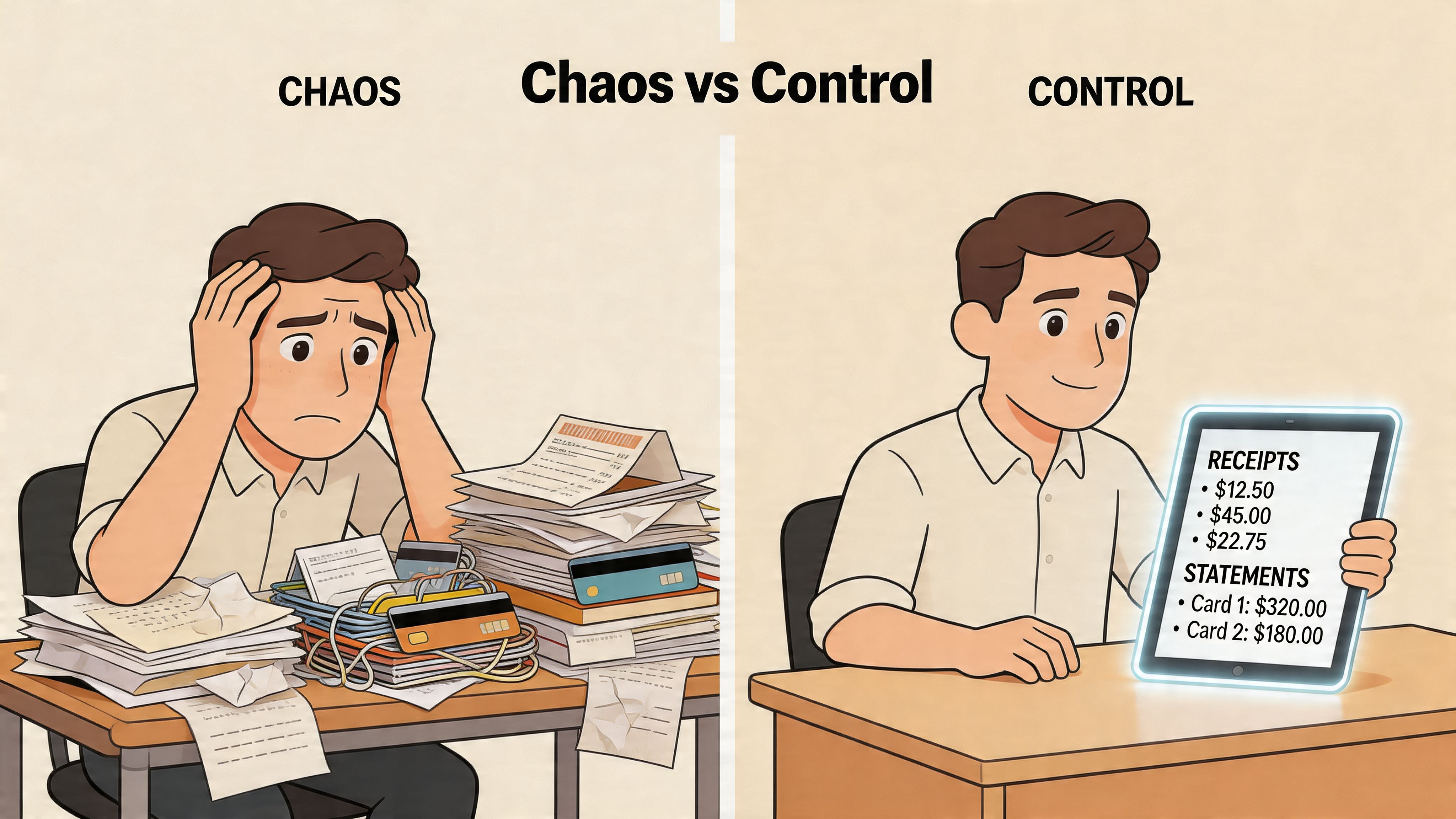
An e procurement system brings order to that mess. Instead of letting staff buy first and explain later, it puts requests, approvals, vendor details, purchase orders, receipts, and invoices into one digital path. Think of it as a front door for spending. If a purchase doesn’t come through that door, it isn’t complete.
What changes in daily work
Here’s what often shifts right away:
- Requests become visible: Staff submit a purchase request in one place instead of emailing around for approval.
- Approvals follow rules: The right person signs off before money is committed.
- Documents stay together: Orders, invoices, and receipts live in one record instead of five locations.
- Finance gets context: The accounting team sees why something was bought, not just that money left the bank.
Practical rule: If your team can’t trace a purchase from request to payment in a few minutes, your process is too fragile for grant-funded work.
For nonprofits trying to tighten the payables side too, this guide to Accounts Payable Automation Tools is a useful companion resource because procurement control and invoice processing work best together.
The payoff isn’t “more software.” It’s fewer surprises. When a funder asks how you approved a vendor expense, you’re no longer piecing together a story from inboxes and memory. You’re opening a documented record.
What Exactly Is an E-Procurement System?
An e procurement system is a digital tool that manages purchasing from the first request through the final records tied to that purchase. It covers the request, approval, vendor details, purchase order, invoice, receipt, and payment handoff.
That distinction matters for nonprofits.
A lot of nonprofit leaders hear the term and assume it means online buying or basic accounting software. In practice, it does a different job. Online buying helps someone place an order. Accounting software records what already happened. An e procurement system controls the steps before money is committed, which is often the point where grant compliance problems begin.
For a grant-funded organization, that early control can prevent a familiar headache. A staff member may need event supplies, a consultant, or participant support items quickly. If the funding source, approval path, and documentation are unclear at the start, finance ends up fixing the record later, often under deadline and with incomplete information.
How the system works in real life
An e procurement system brings together three functions that nonprofits often keep in separate places.
- Request management so staff start with the same form and include the reason for the purchase
- Approval controls so the right manager or budget owner signs off before the order is placed
- Recordkeeping so receipts, invoices, and supporting documents stay attached to one purchase history
A simple comparison helps here. The request and approval side works like a traffic checkpoint. The recordkeeping side works like a digital filing cabinet for receipts, contracts, and purchase details. Put together, the system gives your team one place to follow the full story of a purchase.
Here is what that can look like. A program coordinator requests outreach materials charged to a restricted grant. A supervisor reviews the purpose. Finance checks the coding. Operations sends the purchase order. Later, the invoice and receipt are attached to that same record. No one has to search email, Slack, and shared drives to reconstruct what happened.
What it usually includes
Most e procurement systems include tools like these:
- Request intake so staff do not create their own forms or email chains
- Approval routing based on role, department, funding source, or budget owner
- Vendor records with contracts, contacts, insurance files, and payment details
- Purchase order creation so suppliers receive a formal authorization
- Invoice and receipt capture so backup documents stay tied to the purchase
- Reporting views so finance and leadership can review spending by grant, program, or vendor
A healthy procurement process should let your team answer four questions quickly: who requested it, who approved it, which budget paid for it, and what documents support it.
Why nonprofits need more than a patchwork process
Many nonprofits still rely on a patchwork system. A request starts in email. Approval happens in a message thread. The invoice lands with finance. Grant coding gets added later. That setup can function for a while, especially in a small team, but it breaks down when staff turnover happens, funders ask for support, or an audit begins.
An e procurement system gives the organization one consistent record for each purchase. That helps with internal control, but it also supports something nonprofits greatly value. Trust. When a funder wants to know whether restricted dollars were used correctly, your team can show the approval trail, funding source, vendor documents, and receipts in one place instead of piecing together a narrative from memory.
It also saves staff time in a very practical way. People spend less energy figuring out where to send a request or how to document an expense. Finance spends less time cleaning up after the fact. Program staff spend more time on mission work.
For non-technical leaders, the simplest way to understand the software is this: it creates a clear, repeatable path for spending, with proof attached at each step. That is why it matters so much in grant-funded work.
Core Features That Simplify Grant-Funded Purchasing
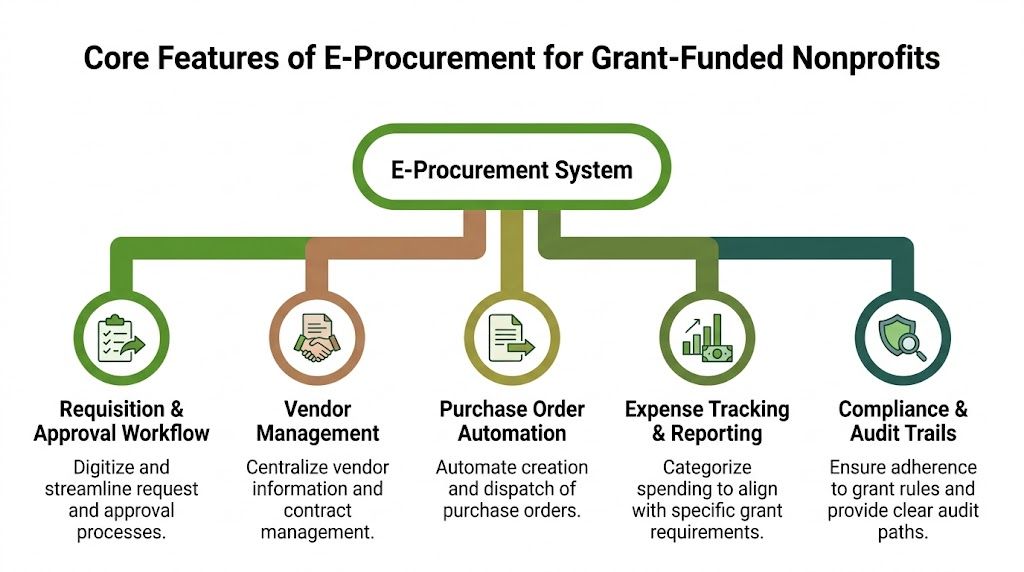
The best way to understand an e procurement system is to connect each feature to a headache your team already has. Nonprofits rarely need fancy procurement language. They need fewer missing receipts, cleaner approvals, and better records for restricted funding.
Requisitions and approvals
A purchase requisition is a formal request to buy something. In a nonprofit, that might be classroom supplies, consulting time, laptops, transportation vouchers, or food for an outreach event.
Without a requisition step, staff often purchase first and document later. That creates trouble when the expense turns out to be outside a grant budget or missing required approval.
With digital requisitions, staff enter the purpose, amount, vendor, and funding source before the order is placed. The system then routes the request to the right approver.
This helps in two ways:
- Program staff know what to submit
- Finance gets pre-spend visibility instead of post-spend cleanup
Vendor management
Most nonprofits have vendor information scattered across folders, inboxes, and finance files. One person knows the approved caterer. Another knows the consultant’s contract terms. Finance knows whether the payment file is complete. No one has the whole picture.
Vendor management brings that together. You keep supplier contacts, contracts, tax forms, and status notes in one place.
That matters when you need to answer practical questions like:
| Question | Why it matters |
|---|---|
| Is this vendor already approved? | Prevents duplicate setup work |
| Do we have the required paperwork? | Supports compliance and payment readiness |
| Have we used them before? | Helps with continuity and review |
| Which programs use this vendor? | Improves coordination across teams |
Purchase order automation
A purchase order is a formal record of what your organization agreed to buy. For grant-funded purchases, that record can be very helpful because it shows the amount, vendor, items, and authorization before the invoice arrives.
When purchase orders are automated, staff don’t have to build them manually in Word or improvise with emails. The system generates them from approved requests and sends them to the supplier.
Field note: A purchase order is less about bureaucracy and more about memory. It captures the agreement before details get fuzzy.
Three-way matching
This is the feature that usually sounds technical, but it’s simple.
Three-way matching compares three documents:
- The purchase order
- The receipt or proof of delivery
- The vendor invoice
If those three line up, finance can move forward with much more confidence. If they don’t, the discrepancy gets flagged before payment.
According to Tipalti’s explanation of e-procurement, e-procurement systems use three-way matching automation to digitally connect purchase orders, invoices, and receipts. This eliminates manual reconciliation, which is especially important for nonprofits that need a clean audit trail for grant spending.
For a nonprofit leader, the practical meaning is this. You no longer rely on someone’s memory to confirm whether a shipment arrived or whether the invoice matches what was approved. The system checks the paper trail for you.
Spend analytics and tracking
A strong e procurement system also helps you see spending while it’s happening, not weeks later. You can review purchases by vendor, program, grant, or category.
That’s useful when a grant manager asks, “How much of our training budget is already committed?” It’s also useful when leadership wants to know whether multiple departments are buying the same supplies from different vendors.
Some teams use this visibility to tighten controls. Others use it to plan better. The point is the same. Data stops living in isolated transactions and starts telling a usable story.
Why these features work together
Each feature solves one part of the problem. Together, they create a complete trail:
- Someone requests the purchase.
- The right person approves it.
- The vendor is selected from a documented list.
- A purchase order captures the commitment.
- The invoice and receipt get matched to the order.
- Reporting shows where the money went.
For grant-funded work, that chain matters as much as the purchase itself.
The Strategic Benefits for Mission-Driven Organizations
Efficiency gets the conversation started. Trust is what makes the investment worthwhile.
Nonprofits don’t adopt an e procurement system just to move forms faster. They adopt it because funders, boards, and auditors expect financial control. The stronger your process, the easier it is to show that restricted dollars were handled carefully.
Funder confidence grows when records are easy to prove
A funder rarely sees your whole operation. They see what your reports, budgets, and documentation reveal. If your purchasing records are inconsistent, they may worry about more than one invoice. They may question your internal controls.
An e procurement system helps you show your work. Approvals, vendor history, order records, and supporting documents stay connected.
That’s one reason real-time visibility matters. Procurify’s overview of e-procurement benefits notes that e-procurement analytics provide real-time visibility into spending, allowing organizations to track KPIs like delivery times and budget adherence. For nonprofits, that creates an auditable repository of procurement decisions that can help demonstrate programmatic spending efficiency to funders.
Compliance gets built into the process
Many grant problems don’t come from fraud. They come from informal habits. A staff member assumes a purchase is allowed. Someone forgets the pre-approval rule. A vendor invoice gets coded after the fact with incomplete detail.
A better procurement workflow builds the guardrails upfront.
Here’s what that often looks like in practice:
- Budget alignment before purchase: Staff identify the correct program or grant during the request stage
- Required approvals in sequence: The request can’t move forward until the right people sign off
- Consistent documentation: Receipts, invoices, and purchase records stay attached to the same transaction
- Cleaner review process: Finance can verify support without chasing multiple departments
That doesn’t eliminate judgment calls, but it does reduce preventable mistakes.
Staff time returns to mission work
Program teams usually don’t complain that procurement lacks sophistication. They complain that it wastes time. They chase signatures, resend documents, and answer the same questions repeatedly.
When the workflow is standardized, the burden shifts away from individual memory. Staff know where to submit requests and what information is required. Finance no longer needs to become a detective for every payment.
This walkthrough offers a helpful visual overview of how digital purchasing supports oversight and control:
Better operations don’t compete with mission work. They protect it by reducing the amount of staff energy lost to preventable admin.
Leaders make stronger decisions with better visibility
Strategic leadership gets easier when spending data is timely and organized. You can spot duplicate vendors, monitor purchasing patterns, and notice when a grant category is getting tight before the budget is overspent.
That helps executive directors answer questions that matter:
- Are we buying consistently across programs?
- Do we have too many one-off vendors?
- Which purchases are recurring enough to standardize?
- Where do approvals get stuck?
An e procurement system won’t replace financial judgment. It gives your team cleaner information so judgment improves.
For mission-driven organizations, that’s the core benefit. More control over spending means more credibility with funders, less administrative drag on staff, and better stewardship of every restricted dollar.
A Practical Implementation Plan for Small Nonprofits
Small nonprofits often assume procurement software is only for large institutions with an IT team, a procurement manager, and months to spare. In reality, the bigger risk is staying stuck with half-manual processes that no one fully owns.
One challenge deserves special attention. The Open Contracting discussion of e-procurement implementation highlights fragmented implementation as a serious issue. It also notes that 70% of small organizations still use manual processes, which makes full adoption harder when staff capacity is already thin.
Start with your current mess, not the software demo
Before you look at vendors, map what happens today. Don’t worry about making it pretty. A whiteboard, sticky notes, or a simple document works fine.
Track one common purchase from start to finish. Follow office supplies, a contractor invoice, or program materials. Write down every handoff, approval, document, and delay.
You’re looking for friction such as:
- Email-only approvals that get buried
- Budget checks that happen after the order
- Receipts that arrive late or never
- Vendor setup steps that live in one person’s head
Once you observe the workflow, simplify it. Don’t automate clutter.
Pick a small project team
You don’t need a steering committee with twelve people. You do need a few voices from the right functions.
A practical team usually includes:
- Finance, because coding, documentation, and payment rules matter
- Programs, because they initiate many purchases and will live in the process
- Operations or admin, because someone has to maintain vendor and workflow standards
Give this group a clear job. They aren’t choosing software in a vacuum. They’re designing a process that staff can follow.
Implementation truth: If the people who request purchases aren’t involved early, the old process will survive in parallel.
Roll out in phases
Trying to launch every feature at once is where many nonprofits get stuck. Start with one purchasing lane and do it well.
A workable sequence might be:
- Phase one focuses on purchase requests and approvals
- Phase two adds vendor records and purchase orders
- Phase three connects invoices, receipts, and reporting
That phased approach is especially helpful if your team needs funding for setup or related technology improvements. Nonprofits exploring capacity-building support may find nonprofit technology grants useful when planning how to pay for digital infrastructure.
Train around daily tasks, not software menus
Staff don’t need a lecture on procurement theory. They need answers to ordinary questions.
Use training examples like:
- How do I request food for an event?
- What do I do if the vendor changes the amount?
- Where do I upload a receipt?
- Who approves consultant contracts?
Short job-based training works better than broad system tours. Pair that with a simple written rule: if the purchase isn’t in the system, it isn’t approved.
Watch for parallel processes
The biggest implementation threat isn’t technical failure. It’s drift. Staff may keep using side emails, old forms, or direct purchases “just this once.”
To avoid that, set boundaries early. Retire old forms. Point everyone to one intake path. Review exceptions openly so the team learns where the workflow needs adjustment.
Progress matters more than perfection. A small nonprofit doesn’t need a flawless enterprise rollout. It needs a purchasing process that people will use, with enough structure to protect grant funds and reduce cleanup later.
How to Choose the Right E-Procurement Vendor
A nonprofit can easily buy the wrong procurement platform. Some tools are built for very large companies with dedicated procurement staff, complex sourcing events, and technical admins. If your team has one finance manager, a part-time operations lead, and busy program staff, that kind of system can create more friction than control.
The right e procurement system should feel manageable on an ordinary Tuesday, not just impressive in a sales demo.
Start with nonprofit reality
When you evaluate vendors, keep your real environment in view. You may need grant tags, simple approvals, and strong audit records more than advanced sourcing modules.
If you’re also reviewing your finance stack, this overview of software for nonprofits accounting can help frame how procurement should fit with the rest of your financial tools.
Another practical need is competitive purchasing. If your organization responds to formal bids or vendor requests, it helps to understand how your procurement workflow connects with proposal work. This resource on how to respond to an RFP is useful when you want tighter alignment between purchasing documentation and external bid processes.
Nonprofit e-procurement vendor checklist
| Evaluation Criteria | What to Look For | Why It Matters for Nonprofits |
|---|---|---|
| Ease of use | Clear request forms, simple approvals, minimal training burden | Program staff won't adopt a system that feels confusing |
| Grant and fund tracking | Ability to tag purchases by grant, program, or restricted fund | Helps maintain cleaner records for reporting and compliance |
| Integration capability | Smooth connection with your accounting and payables workflow | Reduces duplicate entry and reconciliation headaches |
| Vendor management | Central place for supplier records, documents, and status | Prevents missing paperwork and scattered vendor files |
| Audit trail quality | Visible history of requests, approvals, and supporting documents | Makes grant reviews and board oversight easier |
| Pricing flexibility | Entry-level options or scalable plans | Small organizations need room to grow without overspending |
| Support and onboarding | Responsive help, implementation guidance, practical training | Smaller teams often need hands-on support |
| Configuration simplicity | Ability to adjust approvals and fields without heavy technical work | Nonprofits need flexibility without relying on developers |
Questions to ask in demos
Don’t ask only what the system can do. Ask how it works in everyday nonprofit situations.
Try questions like these:
- Can a program manager submit a request without finance help?
- Can we require specific fields for grant-funded purchases?
- How do approvals change by amount or department?
- What does the audit trail look like for one transaction?
- How are receipts, invoices, and purchase orders connected?
- What happens if a team receives only part of an order?
- How much configuration can we handle ourselves?
- What support do we get after launch?
Watch for red flags
Some warning signs show up quickly in vendor conversations:
- The demo focuses only on enterprise sourcing features
- Reporting looks polished, but request entry is clunky
- The vendor can’t explain how nonprofits track restricted funds
- Every customization requires paid consulting
- Support sounds generic rather than practical
Choose the system your staff will use consistently, not the one with the longest feature list.
A good vendor fit means your organization can tighten controls without creating a maze. That balance matters. Procurement should become more disciplined, but it still has to work for people who are juggling programs, deadlines, and community needs.
Common Pitfalls and How to Ensure Procurement Equity
Many organizations assume digitizing procurement automatically fixes procurement problems. It doesn’t. A messy process entered into software is still a messy process, just with a login screen.
One common pitfall is automating without simplification. If approvals are unclear, vendor setup is inconsistent, or staff don’t know which purchases require documentation, the system won’t solve the confusion by itself.
Another pitfall is choosing a tool that’s too complex for the team using it. If staff avoid the system because it feels intimidating, shadow processes return fast. Email approvals creep back in. Receipts stay on phones. Side spreadsheets survive.
Equity belongs in procurement design
Mission-driven organizations should also ask a harder question. Who benefits from our purchasing habits?
A transparent process can do more than prevent errors. It can also help you examine whether your spending reflects your values. The Sovra discussion of e-procurement transparency notes that while e-procurement boosts transparency, equity for underserved suppliers remains a critical consideration. It also points to tools like the GSA Procurement Equity Tool as examples of how organizations can identify new vendors and build a more diverse supplier base.
For nonprofits, that can translate into very practical action.
Ways to make procurement more equitable
- Track supplier diversity intentionally: Add fields that help you identify local, minority-owned, women-owned, or mission-aligned vendors where appropriate.
- Review who gets invited to bid: If the same small list of suppliers gets every opportunity, your process may be consistent but not inclusive.
- Simplify vendor onboarding: Complex requirements can shut out smaller community-based suppliers.
- Document selection criteria: Clear criteria reduce the chance that preference, habit, or convenience shapes decisions.
Procurement equity isn’t separate from financial control. It’s part of how an organization shows fairness, transparency, and alignment with mission.
Conflict standards matter here too. If you’re building a more transparent purchasing process, your policies should support it. This guide to a conflict of interest policy for nonprofits is a useful companion when reviewing how vendor selection decisions are governed.
A better question to ask
Instead of asking only, “Will this system control spending?” ask, “Will this system help us buy in a way that matches our values?”
That shift changes procurement from a back-office task into a mission-support function. You still need strong approvals and clean records. But you also gain the ability to examine who receives your organization’s business and whether your buying practices open doors or keep them closed.
Streamline Spending to Accelerate Your Mission
An e procurement system isn’t just a digital upgrade. For nonprofits, it’s a way to replace scattered purchasing habits with a process that protects grants, supports audits, and gives leaders clearer control over spending.
When requests, approvals, vendor records, and documentation live in one workflow, teams spend less time chasing paperwork and more time serving people. Finance gets stronger records. Program staff get a clearer path. Funders get better evidence that their dollars are being managed responsibly.
That’s the bigger shift. Procurement stops being a recurring source of stress and becomes part of your organization’s credibility. If your current process depends on inboxes, memory, and last-minute cleanup, even a modest move toward structured digital purchasing can create real relief.
If your nonprofit wants help beyond purchasing, Fundsprout helps mission-driven teams find funding, manage grant requirements, and stay compliant from application through renewal. It’s built for organizations that need stronger systems without adding unnecessary complexity.
Try 14 days free
Get started with Fundsprout so you can focus on what really matters.