Manage a System to manage multiple grant reporting requirements for nonprofits
Learn practical steps to manage multiple grant reporting requirements efficiently and keep funders confident.

Abdifatah Ali
Co-Founder
If you've ever felt buried under a mountain of grant reports, you're not alone. Juggling multiple funder requirements often feels like a high-wire act without a net. The secret to getting off that wire isn't working harder; it's working smarter by building a centralized system to track deadlines, standardize content, and get your data collection on autopilot.
This kind of structure does more than just prevent compliance headaches. It transforms reporting from a frantic, last-minute scramble into a controlled, strategic process that actually makes your funder relationships stronger.
The Reality of Grant Reporting Overload
Let’s be honest: for most nonprofit leaders, the grant reporting cycle is a recurring nightmare. You might have a small team trying to manage three major grants simultaneously. One is a federal grant buried in compliance rules, another is a state grant demanding very specific quarterly data, and the third is from a foundation that wants a unique narrative format.
They all have clashing deadlines and require information pulled from completely different departments. The result? A mad dash to piece everything together, hoping you didn't miss anything critical. This isn't just inefficient—it's a massive risk to your organization's funding and reputation. In a world of increased funder scrutiny and shrinking unrestricted funds, every single report is a test of your credibility.
Why The Old Way Is Broken
Relying on scattered spreadsheets, endless email chains, and manual data entry is a recipe for disaster. When your program manager has one set of impact numbers and your finance team has another, the final report is immediately compromised. This chaotic approach inevitably leads to missed deadlines, inconsistent messaging, and countless hours of staff time that should be spent on your mission.
This isn't just an anecdotal problem. A staggering 64% of nonprofits say that less than half of their grants provide unrestricted support. That forces teams to navigate an incredibly complex web of reporting rules from dozens of different funders.
The real cost of disorganized grant reporting isn't just the stress—it's the erosion of trust with funders. A late or inaccurate report signals instability, jeopardizing future awards you've worked hard to secure.
The Shift To A System-Based Approach
The only way to get ahead is to build a centralized, repeatable system. This isn't about buying a single piece of software and hoping for the best. It's about adopting a strategic mindset that puts clarity, consistency, and control first. This playbook will walk you through actionable strategies to build that system—one that saves time, eliminates errors, and strengthens the funder relationships you depend on.
To get a handle on these challenges, it’s helpful to understand the essential grant management best practices that provide a framework for strategic oversight.
Before we dive into the "how," let's look at the "why." A well-designed system completely changes the game.
From Grant Reporting Chaos to Control
The difference between a disorganized process and a structured one is night and day. One drains your resources and creates risk, while the other builds capacity and confidence.
This table really just scratches the surface. The goal is to move your team firmly into that right-hand column, turning a major pain point into a genuine organizational strength.
A strong system offers clear advantages:
- Total Visibility: A master calendar means no deadline is ever a surprise.
- Unwavering Consistency: A content library keeps your organizational story clear and accurate across all reports.
- Clear Accountability: Defined roles prevent critical tasks from being forgotten.
- Enhanced Efficiency: Automation frees your team from the tedious work of hunting down numbers and filling out forms.
By putting these strategies into practice, you turn reporting from a dreaded chore into a powerful opportunity to showcase your impact. For a deeper dive into the foundational principles, check out our guide on grant management best practices for nonprofits.
Create Your Master Reporting Calendar
If you're still relying on scattered spreadsheets and hoping everyone remembers their deadlines, you're setting yourself up for a frantic, last-minute scramble. I've seen it happen time and time again. The single most important thing you can do to get a handle on multiple grant reports is to build a master reporting calendar.
This isn't just a simple list of due dates. Think of it as your strategic command center—a roadmap that shows the entire lifecycle of every grant you're managing. It's about shifting from a reactive "Oh no, a report is due!" mindset to a proactive one where you see every deadline coming months in advance. This one central source of truth gets everyone, from program staff to the finance team, on the same page.
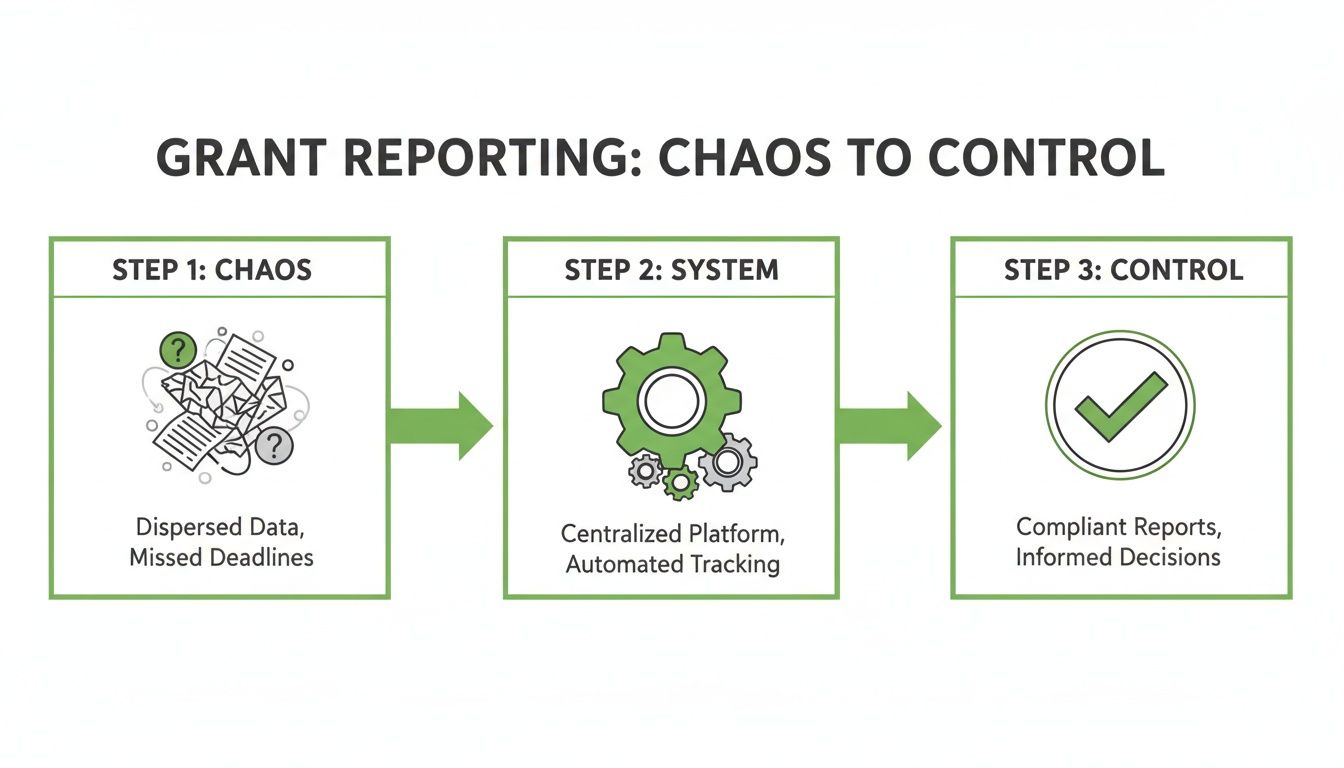
This journey from chaos to control is powered by a well-structured system. Your calendar is the bridge that gets you there.
Choosing the Right Tool for Your Team
Let's be realistic: the "best" tool is the one your team will actually open and use every day. You don't need a pricey, complex platform right out of the gate. The goal here is simple: accessibility, visibility, and ease of use.
Here are a few options, depending on your team's size and comfort level with technology:
- Shared Digital Calendars (Google Calendar, Outlook): This is the easiest place to start. For small teams, creating a dedicated "Grants" calendar that everyone can see is a quick, no-cost win. It’s perfect for visualizing all the big deadlines at a glance.
- Project Management Apps (Asana, Trello, Monday): These platforms give you more power. You can turn each report into a "card" or "task," then build out a full checklist of smaller steps, assign them to specific people, and even attach documents right to the task.
- Dedicated Grant Management Software: If your organization is juggling dozens of grants, a specialized system is an investment that pays for itself. These tools often have built-in calendars that connect directly to financial tracking, document storage, and automated reminders, creating a truly unified hub.
Whatever you choose, the key is to commit. Pick one system and make it the standard. Don't let people fall back into their old, siloed habits.
What to Track Besides the Due Date
A truly useful calendar goes way beyond just the final submission date. Its real power comes from plotting out the entire reporting workflow by working backward from the deadline. This is what separates a calm, controlled process from a chaotic one.
I see this all the time—people only plot the final due date. A great reporting calendar is all about backward planning. It schedules the key milestones you need to hit so there’s no last-minute panic.
For every single grant report, your calendar should have entries for these crucial checkpoints:
- Data Collection Kick-Off: This is the starting gun. Put a date on the calendar when program and finance teams need to start pulling their numbers. I recommend scheduling this 4-6 weeks before the final due date to leave plenty of time to sort out any issues.
- Narrative First Draft Deadline: The person writing the report needs their own firm, internal deadline. Give them at least 2-3 weeks before the submission date so there’s time for review and edits.
- Financial Reconciliation: This is a key checkpoint where the finance team gives their final sign-off, confirming all expenses line up with the grant budget before handing the data over.
- Internal Review & Approval: Don't just hope this happens. Block out specific time on the calendar for leadership to review the complete draft.
- Final Submission Date: This is the big one. It's the non-negotiable, external deadline. Make it stand out—color-code it red or flag it as high-priority.
Mapping out these stages creates a predictable, manageable rhythm for your entire reporting cycle. For a deeper dive into setting up a bulletproof system, you can learn how to create a time management calendar that aligns perfectly with these principles.
And of course, while you're managing current grants, you always need to be looking for the next opportunity. You can find new funding sources using a free grant database for nonprofits to keep your pipeline healthy.
Build a Library of Reusable Content
So many nonprofits I see treat every grant report like it's the first one they've ever written. They start from a blank page, trying to reinvent the wheel each time. This isn’t just slow; it’s a direct path to burnout and, worse, inconsistent messaging to your funders.
Let's break that cycle. The secret is to stop rewriting and start assembling. Creating a central library of your best, most essential content is probably the single most powerful thing you can do to manage multiple reporting deadlines without losing your mind.
Think of it as your organization's "golden source" of information. It's a curated collection of pre-approved, data-backed content blocks you can grab and adapt for virtually any report. No more digging through last year's proposals to find that one perfect paragraph about your program's impact. It's all right there.
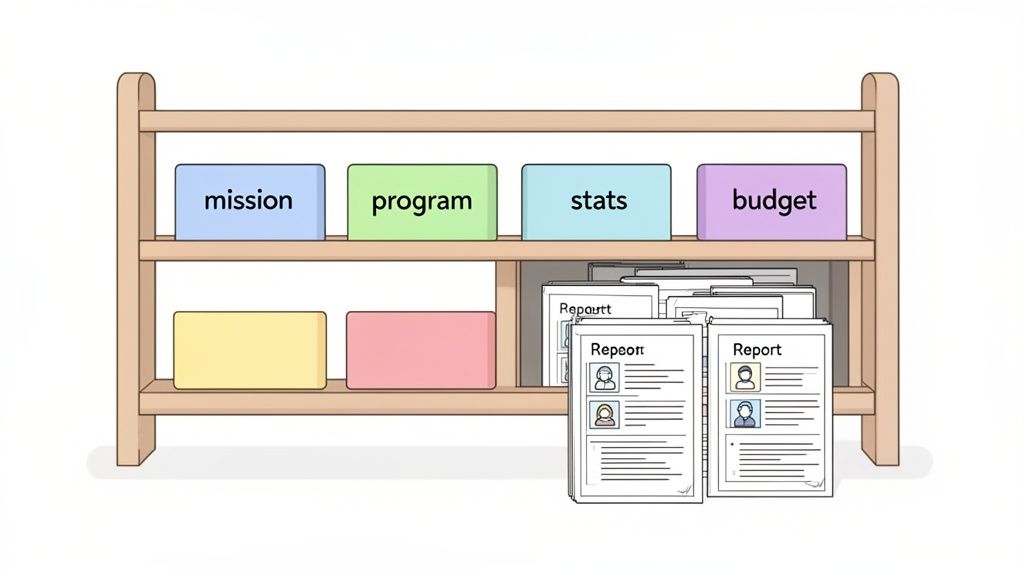
This approach ensures your story stays consistent, accurate, and compelling, regardless of who's reading it.
What Goes into Your Content Library?
This isn't just a junk drawer for old documents. A truly useful library is a structured, modular system where every piece of content has a job. I recommend starting with dedicated folders or documents for these core categories.
Here are the essential building blocks you'll find yourself using again and again:
- Organizational Information: Your official mission and vision statements, a tight one-paragraph history of the organization, and the bios for your key leadership team.
- Program Descriptions: For each core program, write a solid one-page summary. Make sure it covers the target population, key activities, goals, and the outcomes you’re aiming for.
- Key Statistics and Impact Data: This is your evidence locker. Keep your most powerful, up-to-date numbers here—think things like "served 1,500 individuals last quarter" or "achieved an 85% success rate in our job placement program."
- Standard Budget Narratives: Work with your finance folks to craft clear, simple justifications for common line items like personnel, supplies, and administrative overhead.
With these core pieces in place, I’ve seen teams populate up to 70% of a standard report before they even touch the custom narrative sections. It’s a game-changer. If you need help structuring these narratives, our nonprofit grant proposal template is a fantastic resource for building out these content blocks.
A Real-World Example in Action
Let’s say you have three reports due for your after-school tutoring program, and each funder has a slightly different angle.
- Funder A (Community Foundation): They want to hear about community impact and see powerful student success stories.
- Funder B (Corporate Sponsor): They're all about the hard data—academic improvement metrics and a detailed budget breakdown are a must.
- Funder C (Government Agency): This one requires a formal, by-the-book report on program activities and strict adherence to their guidelines.
Without a content library, your team is stuck writing three entirely separate reports. With one, the whole process is different.
A content library transforms report writing from an art into a science. You're no longer staring at a blank canvas; you're assembling a masterpiece from proven components, leaving you more time to perfect the unique details.
For all three reports, you pull the same core program description and organizational history. Funder A gets the pre-written success stories you’ve collected. Funder B gets the standard budget narrative and your latest academic stats. Funder C receives the official log of program activities.
Suddenly, the job isn't about rewriting the basics. It’s about strategically tailoring that final 30% to what each funder really cares about.
Keeping Your Content Library Fresh and Relevant
A content library is a living tool, not a dusty archive. To keep it useful, you need a simple maintenance plan. The biggest mistake I see is when an organization builds a beautiful library and then forgets it exists for a year.
Here’s a simple system to keep it current:
- Assign an Owner: Put one person in charge—the Grant Manager or Development Lead is usually a good fit. They are the official "librarian" responsible for keeping everything up-to-date.
- Schedule Quarterly Reviews: Set a recurring calendar reminder for the team to review all the content. This is your dedicated time to update stats, add new achievements to program descriptions, and swap in new staff bios.
- Capture New Content As You Go: When you write a particularly great narrative for a specific report, don't let it get lost in an old file. The library owner’s job is to grab that new gem, categorize it, and add it to the library for everyone to use.
This small, ongoing investment of time pays off massively. It guarantees your team always has the best, most accurate information at their fingertips, making every single report stronger and a whole lot easier to write.
Define Roles and a Flawless Review Process
Even the best-laid plans—a perfect calendar and a meticulously organized content library—will crumble if your team is tripping over each other's feet. When a deadline is breathing down your neck, ambiguity is the last thing you need.
This is where the human element comes in. Establishing who does what and building a rock-solid review process is what makes the whole system click. It’s how you prevent the bottlenecks and last-minute scrambles that always seem to end in mistakes. A great system only works with a great team, and that starts with everyone knowing their part.
Assigning Ownership with a RACI Chart
You don't need a dizzying org chart to create accountability. A simple tool I’ve used for years is the RACI chart. It’s a game-changer.
RACI stands for Responsible, Accountable, Consulted, and Informed. It’s just a straightforward matrix that maps out every task and assigns a person to it, completely wiping out any confusion over who owns what.
For each big step in the reporting process, you assign a letter:
- Responsible: This is the doer. The person whose hands are on the keyboard, actually pulling the data or writing the draft. For example, the Program Manager.
- Accountable: This is the person who ultimately owns the outcome. The buck stops with them. Critically, there should only be one "A" per task to avoid confusion. This is often the Development Lead for the final submission.
- Consulted: These are your subject matter experts. The people you need to check in with for input, like the Finance Officer who needs to review the budget narrative.
- Informed: These are the folks who just need a heads-up. They aren’t directly involved, but they need to know what's going on, like the Executive Director being notified once a report is submitted.
This simple framework creates a clear chain of command and gets rid of the guesswork. When the Development Lead needs final program numbers, they know exactly who is responsible and when they need to deliver. It transforms a vague group effort into a series of clear, individual assignments.
The real magic of a RACI chart is that it forces a conversation about who is truly in charge of each step. It uncovers hidden assumptions and prevents that all-too-common nightmare where everyone thought someone else was handling a critical task.
Sample RACI Chart for Grant Reporting
To give you a better idea, here’s a practical example of what a RACI chart could look like for a standard grant report. Think of this as a starting point—you can easily adapt it to fit your team's unique roles and workflow.
This table clarifies responsibilities at a glance, ensuring that from data collection to final submission, every step has a clear owner.
Building a Bulletproof Quality Assurance Process
Okay, so roles are clear. What's next? You need a review process that catches mistakes before your funder does. Nothing undermines your credibility faster than a sloppy, error-filled report.
Your quality assurance (QA) process should be a non-negotiable final checkpoint. This isn't just about a quick proofread for typos; it's a deep dive to ensure accuracy, consistency, and compliance. I highly recommend creating a multi-point checklist that becomes the go-to standard for every single review.
Your QA checklist should cover three critical areas:
Data and Financial Accuracy: Do the impact numbers in the narrative perfectly match the raw data from the program team? Do the expenses in the financial report align with the approved grant budget, down to the penny? This is where looping in the Finance Officer is essential.
Narrative and Messaging Consistency: Does the story you're telling actually line up with your organization's mission and what you promised in the original proposal? Are you using the same key stats and program descriptions from your content library? Consistency is key.
Funder Guideline Compliance: This is a big one. Have you followed every single formatting rule? Answered every single question? Used the funder’s required template? One tiny missed instruction can be the difference between a successful report and a frustrating compliance issue.
When you formalize this review, you create a powerful feedback loop. Each report becomes a chance to get better—to refine your data, strengthen your stories, and master the art of managing complex grant reporting. This audit trail doesn't just keep you compliant today; it gives you a goldmine of insights for knocking your next renewal application out of the park.
Use Automation to Your Advantage
Let's be honest: your team's time is your most valuable resource, and manual grant reporting is a notorious time thief. The endless cycle of chasing down data, copying and pasting narratives, and sending reminder emails is a direct path to burnout for even the most dedicated staff.
This is where automation comes in. It's not about replacing people; it's about empowering them. By automating the grunt work, you free up your team's expertise to focus on strategic relationships and telling your story—the work that actually moves the needle for your mission.
Start with Simple Automation Wins
You don't need to sign a massive software contract to start making a difference. Small, smart automations can immediately ease the pressure of how you manage multiple grant reporting requirements.
Start with what you already have. Go back to that master calendar or project management tool you built and set up automated deadline reminders. A simple ping sent to the right people a week before a draft is due can be the difference between a calm review process and a last-minute scramble.
Another easy win is using shared cloud storage (like Google Drive or SharePoint) with version control for your content library. This automates document management and puts an end to the dreaded "which version is the final one?" question. Everyone works from the most current, approved text, every time.
Connect Your Core Systems for Real Power
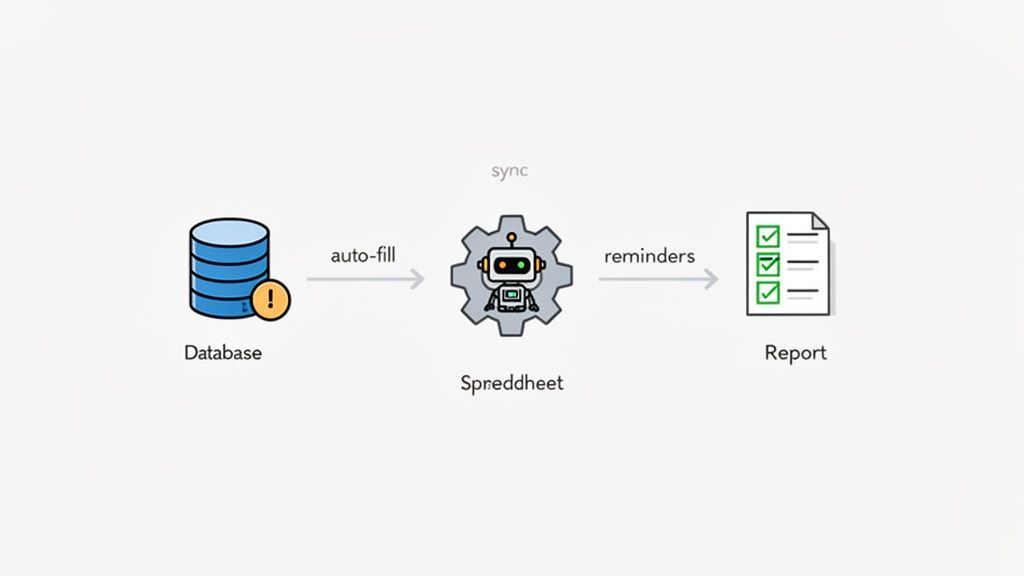
The next step is where things get really interesting: creating a connected ecosystem between your different software platforms. This is how you eliminate the soul-crushing task of manually pulling and re-entering data from one system into another. Your goal is to establish a single source of truth that feeds your reports directly.
Here are a couple of powerful integrations to consider:
- Program Management to Reporting Dashboards: Hook up your program management software—where you're tracking client services and outcomes—to a reporting dashboard. Suddenly, you're pulling real-time impact data automatically, ensuring your reports are always backed by the latest, most accurate numbers.
- Financial Software to Grant Budgets: This one is a game-changer. Integrating your accounting system with your grant management tool allows you to track spending against grant budgets in real time. You can generate financial reports with a click, which drastically reduces the risk of human error.
This level of visibility is incredibly important, especially when funding is unstable. In early 2025, a startling 33% of nonprofits reported interruptions from government funding disruptions. Program managers in that situation need clear, automated data to stay on track. Without it, 75% of those facing disruptions are at risk of falling out of compliance. You can read more about how nonprofits are navigating these challenges in this report from Nonprofit Pro.
Auto-Populate Reports from Your Content Library
Now you can bring it all together. Some grant management platforms can connect directly to that standardized content library you so carefully built. Imagine a world where instead of manually copying and pasting your mission statement or program descriptions into every new report, the software does it for you.
When you link your content library to a smart reporting tool, the whole process shifts. It’s no longer about tedious data entry; it becomes a strategic review. Your team's job transforms from filling out forms to making sure the story the data tells is as powerful as it can be.
This approach doesn't just save a few minutes; it can save dozens of hours with every reporting cycle and guarantees absolute consistency in your messaging. It frees your team from the mundane work so they can focus on the truly human parts of the report—the unique, funder-specific narratives that require real insight and strategy.
Answering Your Toughest Grant Reporting Questions
Moving to a more organized system for grant reporting sounds great in theory, but I know what you're thinking: "How will this actually work for my team?" It's one thing to lay out a perfect plan, and another to make it stick amidst the daily chaos of nonprofit work.
Let's dig into some of the most common questions and hurdles I see organizations face when they start getting serious about taming their reporting process.
"We're a Tiny Nonprofit. How Can We Possibly Implement This?"
I get this question all the time, especially from one-person development shops or executive directors who are also the grant writer. When you're already juggling everything, building a "system" can feel like just another overwhelming project.
The key here is progress, not perfection. Don't try to build the entire system at once.
For a tiny team, start with the one thing that will give you the biggest return: the Master Reporting Calendar. You don't need fancy software. A shared Google Calendar or a simple spreadsheet will do the trick. Just getting every deadline and key date out of your head and into one central, visible place is a game-changer. It’s all about preventing those last-minute panic attacks when you realize a report is due tomorrow.
Next, create a simple "Content Library" in a shared Google Doc. Seriously, keep it basic. Start by pasting in your approved mission statement, a standard one-paragraph description of your main program, and your top 3-5 impact stats for the year. That's it. You’ve just saved yourself 20 minutes on the next report.
Even if you're a team of one, mentally separating the roles is crucial. Block out time on your calendar for "Finance Review" versus "Narrative Writing." This forces you to switch gears and focus.
For a small team, the goal isn't to build a complex machine. It's to create simple tools that offload mental strain and stop you from constantly reinventing the wheel. You're making your limited time count.
This approach builds a solid foundation you can add to over time, saving you headaches and hours down the road.
"What's the Best Way to Handle Those Crazy-Complex Funder Templates?"
We've all been there. You open a funder's reporting portal and find a template that seems designed by a committee that never spoke to each other. The questions are bizarre, the format is rigid, and it feels like nothing you've ever written before will work.
The temptation is to just grit your teeth and start from scratch. Don't.
Even the weirdest templates have common threads. Your first move should always be to open your Content Library and drop in all the standard stuff—organizational history, program descriptions, key metrics. You’d be surprised how much of the report this can knock out right away.
Now for the truly unique questions. Instead of seeing them as a one-off chore, treat them as an opportunity to create a new "modular block" for your library. Write a really thoughtful, well-crafted answer. Then, save it. I guarantee a similar question will pop up in a different report later, and you'll have a brilliant starting point instead of a blank page.
For complicated financial sections, sit down with your finance person (or put on your finance hat) and map your standard reports to the funder's required format. Document this mapping process. A little bit of work now saves a massive amount of time and frustration six months from now. The golden rule is to never start from zero.
"How Do We Get Buy-In from Our Already Overworked Teams?"
This is a big one. You can design the world's most efficient system, but if your program and finance colleagues see it as "just another thing the development team is making us do," it's dead on arrival.
You can't sell this as more work. You have to frame it as the solution to their biggest headaches.
- Talk About Their Pain: Don't start with your solution. Start with their problem. "Remember last quarter when we were scrambling at 9 p.m. to find the participant numbers for the Acme Foundation report?" They'll remember.
- Show, Don't Just Tell: Position the system as the direct answer to that pain. Show them the calendar that gives them a month's notice. Show them the content library where their program description is already approved and waiting for them.
- Suggest a Small-Scale Pilot: Ask for their help in testing the new process on just one or two upcoming reports. A real-world demonstration of how much smoother things can be is far more convincing than any presentation you could give.
When your teammates see for themselves that this system actually eliminates the frantic, last-minute work they hate, they’ll quickly become your biggest allies in making it a success.
Ready to stop the scramble and build a system that saves time and strengthens funder relationships? Fundsprout is an AI-powered platform designed to help you find the right grants, write winning proposals, and automate the entire compliance and reporting lifecycle. From auto-populating funder templates to tracking deadlines, our tools give you back the time you need to focus on your mission. See how you can streamline your grant management at https://www.fundsprout.ai.
Try 14 days free
Get started with Fundsprout so you can focus on what really matters.